October 1, 2026
October 1, 2026
How to Track Brand Mentions Across ChatGPT, Claude, Perplexity, and Gemini in 8 Steps
AI assistants are becoming the new front door for product discovery.
AI assistants are becoming the new front door for product discovery.
Why Tracking Brand Mentions in AI Assistants Now Matters
AI assistants are becoming the new front door for product discovery.
Bain reports that 80% of consumers rely on AI-written results for at least 40% of their searches, and 42% of LLM users already ask for shopping recommendations. Google says the Gemini app has passed 1 billion monthly users, while ChatGPT prompt volume grew nearly 70% in early 2025.
If you’re not monitoring how ChatGPT, Claude, Perplexity, and Gemini talk about your brand, you’re flying blind in the fastest-growing discovery channel.
This tutorial walks you step by step through building a practical monitoring pipeline. You’ll learn how to:
Design prompts that reflect real consumer questions
Sample and store AI responses programmatically
Extract brand mentions, sentiment, and citations
Build dashboards showing where you win or lose AI recommendations
This guide is a tactical companion to our pillar piece, “AI Recommendation Analytics: Multi‑Model Benchmarking Across ChatGPT, Claude, Gemini”. Read that for strategy; use this one for implementation.
Step 1: Define Your AI Visibility Objectives
Start by clarifying what you actually want to measure.
For most ecommerce and marketing teams, AI brand monitoring across chatbots and assistants breaks down into four core questions:
Are we mentioned at all? Brand-level visibility in generic and category queries
How are we described? Pros, cons, positioning, sentiment
Which products are recommended? SKU- or line-level recommendations in shopping flows
Which sources drive those mentions? Owned vs earned vs community domains
Choose 3–5 core metrics
For an initial AI visibility program, focus on a small set of KPIs:
Brand mention rate: % of relevant queries where your brand appears
Share of voice: % of total mentions vs top competitors
Recommendation inclusion rate: % of shopping queries where your SKUs are in the shortlist
Sentiment score: ratio of positive vs negative language in answers
Owned vs third‑party citations: % of citations from your domains vs external sources
Princeton’s GEO research shows optimization can drive up to 40% visibility gains, but only if you can measure these signals consistently.
Step 2: Map Your Priority Query Sets
You can’t track brand mentions in AI assistants without knowing which questions matter most.
Create three query sets:
Branded queries
Examples: "Is [Brand] a good choice for running shoes?"; "[Brand] return policy"
Purpose: Check accuracy and sentiment around your brand directly.
Category/competitor queries
Examples: "Best trail running shoes under $150"; "Nike vs [Brand] trail shoes"
Purpose: Measure whether you surface in consideration sets.
Decision‑stage shopping queries
Examples: "Recommend specific models for wide‑foot running shoes"; "What’s the best shampoo for sensitive scalp?"
Purpose: Track product‑level recommendations and SKU visibility.
Target 50–200 core queries to start
For mid‑market and enterprise ecommerce brands:
50–80 queries: good for a pilot
150–200 queries: solid for ongoing multi‑model benchmarking
You can expand over time using:
Search query reports from SEO tools
Internal site search logs
Chat transcripts from customer support
Era’s query discovery API (for AI‑native long‑tail and agentic commerce patterns)
Step 3: Design AI-Friendly Prompt Templates
AI assistants rephrase and interpret queries, so you need prompt templates that mirror how real users ask questions.
Core prompt patterns to use
For each query, build 3–5 variations in natural language:
General recommendations
"What are the best [category] for [use case]?"
"Which brands are most trusted for [category] in [region]?"
Comparison prompts
"Compare [Brand] to [Competitor] for [category]."
"Is [Brand] better than [Competitor] for [specific feature]?"
Shopping assistant prompts
"Act as a shopping assistant and recommend specific products for [scenario]."
"Which SKUs should I buy if I need [criteria: price, size, material, region]?"
Fact‑checking prompts
"Summarize the pros and cons of [Brand] according to recent reviews."
"What do people say about [Brand] on review sites and social media?"
Make prompts machine‑trackable
To simplify analysis:
Store each prompt with a unique Prompt ID
Tag prompts by intent (brand, category, decision‑stage, competitor)
Attach metadata: region, language, model, and run date
This structure lets you group results and build GEO/AEO dashboards later.
Step 4: Connect to Each AI Model (APIs & Interfaces)
All four target surfaces now support web‑grounded answers and citations, which makes automated tracking possible.
ChatGPT (OpenAI)
Use the OpenAI API with the web search tool enabled
ChatGPT Search is available to Free, Plus, Team, Edu, and Enterprise users
Logged‑out users also get search, but programmatic tracking requires API access
Key parameters:
model: e.g.,gpt-4.1or latesttools: include the web search tool per OpenAI docsmetadata: pass a correlation ID for each query and prompt
Claude
Use the Anthropic Messages API with web search enabled
Claude’s web grounding returns cited sources, useful for citation analysis
Key parameters:
model: e.g.,claude-3.5-sonnetor latestsysteminstructions: ask for explicit citations and structured answers
Perplexity
Use the Perplexity API to get:
Ranked search results (raw)
Web‑grounded answers with citations
Perplexity is particularly useful for:
Comparing ranked result visibility vs answer‑layer visibility
Tracking where you appear in result lists even if you’re not mentioned in summaries
Gemini
Use the Gemini API with Google Search grounding enabled
Gemini’s answers include inline citations across supported languages
Key benefits:
Access to global scale (1B+ MAU)
Strong coverage in multi‑language and multi‑region queries
If you don’t want to build this yourself, platforms like Era offer:
Multi‑model, multi‑region AI visibility monitoring
SKU‑level tracking for ecommerce
Daily sampling and GEO optimization workflows
Step 5: Implement a Sampling Strategy (Don’t Trust Single Runs)
Generative answers are non‑deterministic—they vary by run, time, and context.
A 2026 measurement study recommends treating visibility as a distribution, not a fixed score. AirOps found that identical queries across models only produced consistent brand mentions about two‑thirds of the time.
Practical sampling rules
For each query–model pair:
Run 3–5 samples per day for high‑value queries
Run daily or weekly batches depending on volatility and importance
Maintain time windows (e.g., last 7 days, last 30 days) for trend analysis
Track contextual factors
Log these attributes with every response:
Model and version (ChatGPT vs Gemini vs Claude vs Perplexity)
Location/region (city, country, or generic)
Language
Timestamp
This data lets you answer questions like:
"Are we mentioned more often in English than German?"
"Does our share of voice improve after a product launch?"
"Is Gemini more favorable than Perplexity for our brand?"
Step 6: Extract Mentions, Sentiment, and Citations
Once you’re capturing responses, the next step is to structure the data.
You’re aiming to answer:
Did the assistant mention our brand name?
Did it mention our products or SKUs?
How did it describe us (pros, cons, sentiment)?
Which domains were cited as sources?
Build an extraction schema
For each response, store:
Brand Mention Flag: yes/no per brand
Mention Type: brand‑level vs product‑level vs category reference
Sentiment Score: simple positive/neutral/negative plus a numeric measure
Pros & Cons: extracted bullet points or short phrases
Citation Domains: list of domains with counts (owned vs third‑party)
You can:
Use regex + entity recognition for brand/product names
Use an LLM pass (with a separate model) to:
Extract pros, cons, and sentiment
Map citations to owned vs earned vs community categories
Owned vs third‑party visibility
Two recent studies highlight why citation analysis matters:
An arXiv study across 128 brands found 85.7% of citations pointed to non‑owned sources, with 80% of citations coming from just 18% of domains (Wikipedia dominant in 11/12 languages).
Yext’s 6.8M‑citation study found 86% of AI citations came from brand‑managed sources, with first‑party sites at 44% and listings at 42%.
Reconciling these signals in your own data tells you whether:
You’re dependent on community sources (e.g., Wikipedia, Reddit)
Or you’re successfully owning the narrative via brand‑managed properties
Step 7: Build Actionable AI Visibility Dashboards
Now you have structured data; it’s time to turn it into CMO‑ready reporting.
Focus on dashboards that answer:
"Where do we win or lose AI recommendations vs competitors?"
"Which models are strongest or weakest for our brand?"
"Which products are visible in agentic shopping flows—and which are invisible?"
Core dashboard views
Brand Mention Coverage by Model
Metric: % of queries mentioning your brand in ChatGPT, Claude, Perplexity, Gemini
View: stacked or grouped bars; filter by query intent, region, language
Share of Voice vs Competitors
Metric: share of total mentions across all brands
View: pie or bar chart; split by model, category, and query type
Sentiment & Pros/Cons Over Time
Metric: average sentiment score, count of negative pros/cons
View: time series; overlay major campaigns or product updates
Owned vs Third‑Party Citation Mix
Metric: % of citations from owned domains, listings, reviews, community sites
View: stacked bars or funnel from query → answer → citations
SKU‑Level Recommendation Visibility
Metric: % of decision‑stage prompts where specific SKUs appear in the shortlist
View: table or tree map by SKU, category, and region
Here’s a simple view comparing consumer behavior across AI and traditional search.
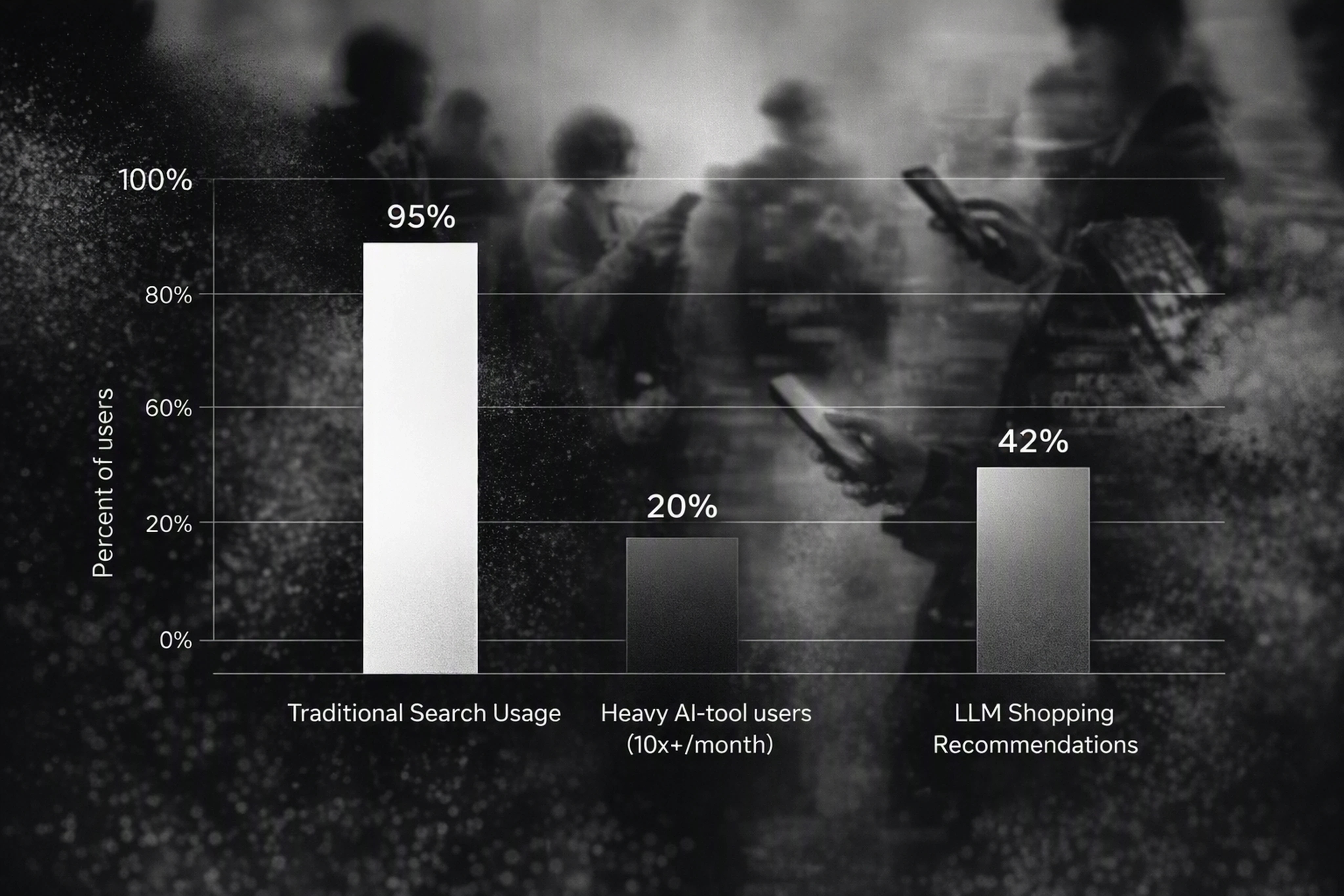
This kind of visualization helps CMOs understand why AI visibility deserves a dedicated budget alongside SEO.
Tools you can use
You don’t have to build everything from scratch.
Options include:
BI tools: Looker, Tableau, Power BI, or Metabase for custom dashboards
Data warehouses: BigQuery, Snowflake, Redshift for storing multi‑model samples
AI visibility platforms (like Era): for:
Out‑of‑the‑box AI visibility dashboards
Multi‑model GEO and AEO reporting
SKU‑level ecommerce analytics and agentic commerce monitoring
Era is designed as a replacement layer for legacy SEO dashboards when you need AI‑focused reporting that reflects how assistants actually recommend brands.
Step 8: Close the Loop with GEO/AEO Optimization
Tracking brand mentions is only half the job. The real value comes from acting on the insights.
Based on your dashboards, prioritize:
Fixing gaps in AI‑critical evidence
Missing specs, prices, availability data
Inconsistent product descriptions across regions and channels
Improving machine‑readable trust signals
Structured data (schema markup) for products and reviews
Up‑to‑date FAQs and policy pages (shipping, returns, warranties)
Strengthening third‑party narratives
Wikipedia and other community sources
Key review sites, marketplace listings, and comparison articles
Launching AI‑optimized content programs
Category and buyer‑guide content tuned to decision criteria
Region‑ and language‑specific pages aligned to local AI usage
Platforms like Era automate much of this work through:
GEO/AEO programs based on multi‑model analytics
A Content Plan that publishes one AI‑optimized article per day directly to your CMS
Ecommerce plans that sync catalogues and keep SKU data aligned with agentic shopping protocols
Over time, you can benchmark the impact of your GEO initiatives against visibility metrics. Princeton’s GEO study suggests up to 40% improvement is realistic when optimization is treated as a formal, ongoing program.
Putting It Together: A Simple Reference Architecture
To recap, a modern AI brand monitoring stack typically looks like this:
Data collection layer
Scheduled queries to ChatGPT, Claude, Perplexity, Gemini
Region and language parameters for each run
Processing & storage layer
LLM‑based extraction for mentions, sentiment, pros/cons, citations
Warehouse tables keyed by query, model, time, and brand
Analytics & optimization layer
Dashboards for multi‑model benchmarking and share of voice
GEO/AEO workflows to fix gaps and improve AI recommendation likelihood
Era effectively provides this "answer‑layer visibility stack" as a tech partner to brands and agencies, so you don’t need to glue together multiple point solutions.
For a deeper strategic view on benchmarking, model differences, and competitive analysis, see our pillar article “AI Recommendation Analytics: Multi‑Model Benchmarking Across ChatGPT, Claude, Gemini”.
FAQ: Tracking Brand Mentions Across ChatGPT, Claude, Perplexity, and Gemini
1. Why do I need separate tracking for AI assistants if I already use SEO tools?
Traditional SEO dashboards measure click‑based visibility in classic SERPs.
AI assistants like ChatGPT and Gemini increasingly answer questions inside the chat, with about 60% of searches ending without a click‑through.
You need dedicated AI visibility and brand monitoring tools to understand how often you’re recommended, how you’re described, and which products are surfaced—none of which appear in standard SEO reports.
2. How often should I sample AI answers to get reliable metrics?
Because responses are non‑deterministic, single snapshots are misleading.
A practical rule of thumb:
3–5 runs per query–model pair for high‑value queries
At least daily sampling for critical categories or campaigns
Trend windows over 7–30 days to smooth out volatility
This approach aligns with recent research that treats AI visibility as a distribution with uncertainty rather than a static ranking.
3. What’s the best way to compare ChatGPT, Claude, Perplexity, and Gemini?
Use common query sets and consistent sampling across models.
For each query:
Run the same prompt variants against all four models
Normalize metrics like mention rate, sentiment, and citation mix
Build dashboards that show per‑model performance side by side
Our pillar guide on multi‑model benchmarking goes deeper into this comparison, including how to interpret model bias and source preferences.
4. How do I know whether owned or third‑party content is driving my AI visibility?
Track citation domains for every answer.
Classify them into:
Owned: your website, subdomains, official blog
Managed: listings and profiles you control
Earned/community: Wikipedia, Reddit, review sites, media
Then, compute:
% of total citations by category
Visibility and sentiment associated with each category
If most positive mentions are tied to community domains, invest in earned and community content. If AI assistants mainly pull from your site, focus on structured, machine‑readable evidence and GEO.
5. Can agencies use these pipelines across multiple clients?
Yes.
Agencies can:
Standardize query sets by vertical (e.g., fashion, electronics, beauty)
Use common extraction schemas across clients
Provide AI visibility reports as a new service line
Era is designed for this use case, with white‑label capabilities, API access, and unlimited seats, so agencies can embed AI visibility and GEO into their offerings without building every pipeline from scratch.
By following these eight steps, you’ll move from ad‑hoc spot checks in ChatGPT to a disciplined, multi‑model AI visibility program.
That’s how you "be the brand" AI systems recommend when consumers ask what to buy.




Why Tracking Brand Mentions in AI Assistants Now Matters
AI assistants are becoming the new front door for product discovery.
Bain reports that 80% of consumers rely on AI-written results for at least 40% of their searches, and 42% of LLM users already ask for shopping recommendations. Google says the Gemini app has passed 1 billion monthly users, while ChatGPT prompt volume grew nearly 70% in early 2025.
If you’re not monitoring how ChatGPT, Claude, Perplexity, and Gemini talk about your brand, you’re flying blind in the fastest-growing discovery channel.
This tutorial walks you step by step through building a practical monitoring pipeline. You’ll learn how to:
Design prompts that reflect real consumer questions
Sample and store AI responses programmatically
Extract brand mentions, sentiment, and citations
Build dashboards showing where you win or lose AI recommendations
This guide is a tactical companion to our pillar piece, “AI Recommendation Analytics: Multi‑Model Benchmarking Across ChatGPT, Claude, Gemini”. Read that for strategy; use this one for implementation.
Step 1: Define Your AI Visibility Objectives
Start by clarifying what you actually want to measure.
For most ecommerce and marketing teams, AI brand monitoring across chatbots and assistants breaks down into four core questions:
Are we mentioned at all? Brand-level visibility in generic and category queries
How are we described? Pros, cons, positioning, sentiment
Which products are recommended? SKU- or line-level recommendations in shopping flows
Which sources drive those mentions? Owned vs earned vs community domains
Choose 3–5 core metrics
For an initial AI visibility program, focus on a small set of KPIs:
Brand mention rate: % of relevant queries where your brand appears
Share of voice: % of total mentions vs top competitors
Recommendation inclusion rate: % of shopping queries where your SKUs are in the shortlist
Sentiment score: ratio of positive vs negative language in answers
Owned vs third‑party citations: % of citations from your domains vs external sources
Princeton’s GEO research shows optimization can drive up to 40% visibility gains, but only if you can measure these signals consistently.
Step 2: Map Your Priority Query Sets
You can’t track brand mentions in AI assistants without knowing which questions matter most.
Create three query sets:
Branded queries
Examples: "Is [Brand] a good choice for running shoes?"; "[Brand] return policy"
Purpose: Check accuracy and sentiment around your brand directly.
Category/competitor queries
Examples: "Best trail running shoes under $150"; "Nike vs [Brand] trail shoes"
Purpose: Measure whether you surface in consideration sets.
Decision‑stage shopping queries
Examples: "Recommend specific models for wide‑foot running shoes"; "What’s the best shampoo for sensitive scalp?"
Purpose: Track product‑level recommendations and SKU visibility.
Target 50–200 core queries to start
For mid‑market and enterprise ecommerce brands:
50–80 queries: good for a pilot
150–200 queries: solid for ongoing multi‑model benchmarking
You can expand over time using:
Search query reports from SEO tools
Internal site search logs
Chat transcripts from customer support
Era’s query discovery API (for AI‑native long‑tail and agentic commerce patterns)
Step 3: Design AI-Friendly Prompt Templates
AI assistants rephrase and interpret queries, so you need prompt templates that mirror how real users ask questions.
Core prompt patterns to use
For each query, build 3–5 variations in natural language:
General recommendations
"What are the best [category] for [use case]?"
"Which brands are most trusted for [category] in [region]?"
Comparison prompts
"Compare [Brand] to [Competitor] for [category]."
"Is [Brand] better than [Competitor] for [specific feature]?"
Shopping assistant prompts
"Act as a shopping assistant and recommend specific products for [scenario]."
"Which SKUs should I buy if I need [criteria: price, size, material, region]?"
Fact‑checking prompts
"Summarize the pros and cons of [Brand] according to recent reviews."
"What do people say about [Brand] on review sites and social media?"
Make prompts machine‑trackable
To simplify analysis:
Store each prompt with a unique Prompt ID
Tag prompts by intent (brand, category, decision‑stage, competitor)
Attach metadata: region, language, model, and run date
This structure lets you group results and build GEO/AEO dashboards later.
Step 4: Connect to Each AI Model (APIs & Interfaces)
All four target surfaces now support web‑grounded answers and citations, which makes automated tracking possible.
ChatGPT (OpenAI)
Use the OpenAI API with the web search tool enabled
ChatGPT Search is available to Free, Plus, Team, Edu, and Enterprise users
Logged‑out users also get search, but programmatic tracking requires API access
Key parameters:
model: e.g.,gpt-4.1or latesttools: include the web search tool per OpenAI docsmetadata: pass a correlation ID for each query and prompt
Claude
Use the Anthropic Messages API with web search enabled
Claude’s web grounding returns cited sources, useful for citation analysis
Key parameters:
model: e.g.,claude-3.5-sonnetor latestsysteminstructions: ask for explicit citations and structured answers
Perplexity
Use the Perplexity API to get:
Ranked search results (raw)
Web‑grounded answers with citations
Perplexity is particularly useful for:
Comparing ranked result visibility vs answer‑layer visibility
Tracking where you appear in result lists even if you’re not mentioned in summaries
Gemini
Use the Gemini API with Google Search grounding enabled
Gemini’s answers include inline citations across supported languages
Key benefits:
Access to global scale (1B+ MAU)
Strong coverage in multi‑language and multi‑region queries
If you don’t want to build this yourself, platforms like Era offer:
Multi‑model, multi‑region AI visibility monitoring
SKU‑level tracking for ecommerce
Daily sampling and GEO optimization workflows
Step 5: Implement a Sampling Strategy (Don’t Trust Single Runs)
Generative answers are non‑deterministic—they vary by run, time, and context.
A 2026 measurement study recommends treating visibility as a distribution, not a fixed score. AirOps found that identical queries across models only produced consistent brand mentions about two‑thirds of the time.
Practical sampling rules
For each query–model pair:
Run 3–5 samples per day for high‑value queries
Run daily or weekly batches depending on volatility and importance
Maintain time windows (e.g., last 7 days, last 30 days) for trend analysis
Track contextual factors
Log these attributes with every response:
Model and version (ChatGPT vs Gemini vs Claude vs Perplexity)
Location/region (city, country, or generic)
Language
Timestamp
This data lets you answer questions like:
"Are we mentioned more often in English than German?"
"Does our share of voice improve after a product launch?"
"Is Gemini more favorable than Perplexity for our brand?"
Step 6: Extract Mentions, Sentiment, and Citations
Once you’re capturing responses, the next step is to structure the data.
You’re aiming to answer:
Did the assistant mention our brand name?
Did it mention our products or SKUs?
How did it describe us (pros, cons, sentiment)?
Which domains were cited as sources?
Build an extraction schema
For each response, store:
Brand Mention Flag: yes/no per brand
Mention Type: brand‑level vs product‑level vs category reference
Sentiment Score: simple positive/neutral/negative plus a numeric measure
Pros & Cons: extracted bullet points or short phrases
Citation Domains: list of domains with counts (owned vs third‑party)
You can:
Use regex + entity recognition for brand/product names
Use an LLM pass (with a separate model) to:
Extract pros, cons, and sentiment
Map citations to owned vs earned vs community categories
Owned vs third‑party visibility
Two recent studies highlight why citation analysis matters:
An arXiv study across 128 brands found 85.7% of citations pointed to non‑owned sources, with 80% of citations coming from just 18% of domains (Wikipedia dominant in 11/12 languages).
Yext’s 6.8M‑citation study found 86% of AI citations came from brand‑managed sources, with first‑party sites at 44% and listings at 42%.
Reconciling these signals in your own data tells you whether:
You’re dependent on community sources (e.g., Wikipedia, Reddit)
Or you’re successfully owning the narrative via brand‑managed properties
Step 7: Build Actionable AI Visibility Dashboards
Now you have structured data; it’s time to turn it into CMO‑ready reporting.
Focus on dashboards that answer:
"Where do we win or lose AI recommendations vs competitors?"
"Which models are strongest or weakest for our brand?"
"Which products are visible in agentic shopping flows—and which are invisible?"
Core dashboard views
Brand Mention Coverage by Model
Metric: % of queries mentioning your brand in ChatGPT, Claude, Perplexity, Gemini
View: stacked or grouped bars; filter by query intent, region, language
Share of Voice vs Competitors
Metric: share of total mentions across all brands
View: pie or bar chart; split by model, category, and query type
Sentiment & Pros/Cons Over Time
Metric: average sentiment score, count of negative pros/cons
View: time series; overlay major campaigns or product updates
Owned vs Third‑Party Citation Mix
Metric: % of citations from owned domains, listings, reviews, community sites
View: stacked bars or funnel from query → answer → citations
SKU‑Level Recommendation Visibility
Metric: % of decision‑stage prompts where specific SKUs appear in the shortlist
View: table or tree map by SKU, category, and region
Here’s a simple view comparing consumer behavior across AI and traditional search.
This kind of visualization helps CMOs understand why AI visibility deserves a dedicated budget alongside SEO.
Tools you can use
You don’t have to build everything from scratch.
Options include:
BI tools: Looker, Tableau, Power BI, or Metabase for custom dashboards
Data warehouses: BigQuery, Snowflake, Redshift for storing multi‑model samples
AI visibility platforms (like Era): for:
Out‑of‑the‑box AI visibility dashboards
Multi‑model GEO and AEO reporting
SKU‑level ecommerce analytics and agentic commerce monitoring
Era is designed as a replacement layer for legacy SEO dashboards when you need AI‑focused reporting that reflects how assistants actually recommend brands.
Step 8: Close the Loop with GEO/AEO Optimization
Tracking brand mentions is only half the job. The real value comes from acting on the insights.
Based on your dashboards, prioritize:
Fixing gaps in AI‑critical evidence
Missing specs, prices, availability data
Inconsistent product descriptions across regions and channels
Improving machine‑readable trust signals
Structured data (schema markup) for products and reviews
Up‑to‑date FAQs and policy pages (shipping, returns, warranties)
Strengthening third‑party narratives
Wikipedia and other community sources
Key review sites, marketplace listings, and comparison articles
Launching AI‑optimized content programs
Category and buyer‑guide content tuned to decision criteria
Region‑ and language‑specific pages aligned to local AI usage
Platforms like Era automate much of this work through:
GEO/AEO programs based on multi‑model analytics
A Content Plan that publishes one AI‑optimized article per day directly to your CMS
Ecommerce plans that sync catalogues and keep SKU data aligned with agentic shopping protocols
Over time, you can benchmark the impact of your GEO initiatives against visibility metrics. Princeton’s GEO study suggests up to 40% improvement is realistic when optimization is treated as a formal, ongoing program.
Putting It Together: A Simple Reference Architecture
To recap, a modern AI brand monitoring stack typically looks like this:
Data collection layer
Scheduled queries to ChatGPT, Claude, Perplexity, Gemini
Region and language parameters for each run
Processing & storage layer
LLM‑based extraction for mentions, sentiment, pros/cons, citations
Warehouse tables keyed by query, model, time, and brand
Analytics & optimization layer
Dashboards for multi‑model benchmarking and share of voice
GEO/AEO workflows to fix gaps and improve AI recommendation likelihood
Era effectively provides this "answer‑layer visibility stack" as a tech partner to brands and agencies, so you don’t need to glue together multiple point solutions.
For a deeper strategic view on benchmarking, model differences, and competitive analysis, see our pillar article “AI Recommendation Analytics: Multi‑Model Benchmarking Across ChatGPT, Claude, Gemini”.
FAQ: Tracking Brand Mentions Across ChatGPT, Claude, Perplexity, and Gemini
1. Why do I need separate tracking for AI assistants if I already use SEO tools?
Traditional SEO dashboards measure click‑based visibility in classic SERPs.
AI assistants like ChatGPT and Gemini increasingly answer questions inside the chat, with about 60% of searches ending without a click‑through.
You need dedicated AI visibility and brand monitoring tools to understand how often you’re recommended, how you’re described, and which products are surfaced—none of which appear in standard SEO reports.
2. How often should I sample AI answers to get reliable metrics?
Because responses are non‑deterministic, single snapshots are misleading.
A practical rule of thumb:
3–5 runs per query–model pair for high‑value queries
At least daily sampling for critical categories or campaigns
Trend windows over 7–30 days to smooth out volatility
This approach aligns with recent research that treats AI visibility as a distribution with uncertainty rather than a static ranking.
3. What’s the best way to compare ChatGPT, Claude, Perplexity, and Gemini?
Use common query sets and consistent sampling across models.
For each query:
Run the same prompt variants against all four models
Normalize metrics like mention rate, sentiment, and citation mix
Build dashboards that show per‑model performance side by side
Our pillar guide on multi‑model benchmarking goes deeper into this comparison, including how to interpret model bias and source preferences.
4. How do I know whether owned or third‑party content is driving my AI visibility?
Track citation domains for every answer.
Classify them into:
Owned: your website, subdomains, official blog
Managed: listings and profiles you control
Earned/community: Wikipedia, Reddit, review sites, media
Then, compute:
% of total citations by category
Visibility and sentiment associated with each category
If most positive mentions are tied to community domains, invest in earned and community content. If AI assistants mainly pull from your site, focus on structured, machine‑readable evidence and GEO.
5. Can agencies use these pipelines across multiple clients?
Yes.
Agencies can:
Standardize query sets by vertical (e.g., fashion, electronics, beauty)
Use common extraction schemas across clients
Provide AI visibility reports as a new service line
Era is designed for this use case, with white‑label capabilities, API access, and unlimited seats, so agencies can embed AI visibility and GEO into their offerings without building every pipeline from scratch.
By following these eight steps, you’ll move from ad‑hoc spot checks in ChatGPT to a disciplined, multi‑model AI visibility program.
That’s how you "be the brand" AI systems recommend when consumers ask what to buy.