October 1, 2026
October 1, 2026
How to Track Brand Mentions in AI and Attribute Referral Traffic Accurately
AI assistants are now a real acquisition channel.
AI assistants are now a real acquisition channel.
Overview: Why AI Referral Tracking Now Matters
AI assistants are now a real acquisition channel.
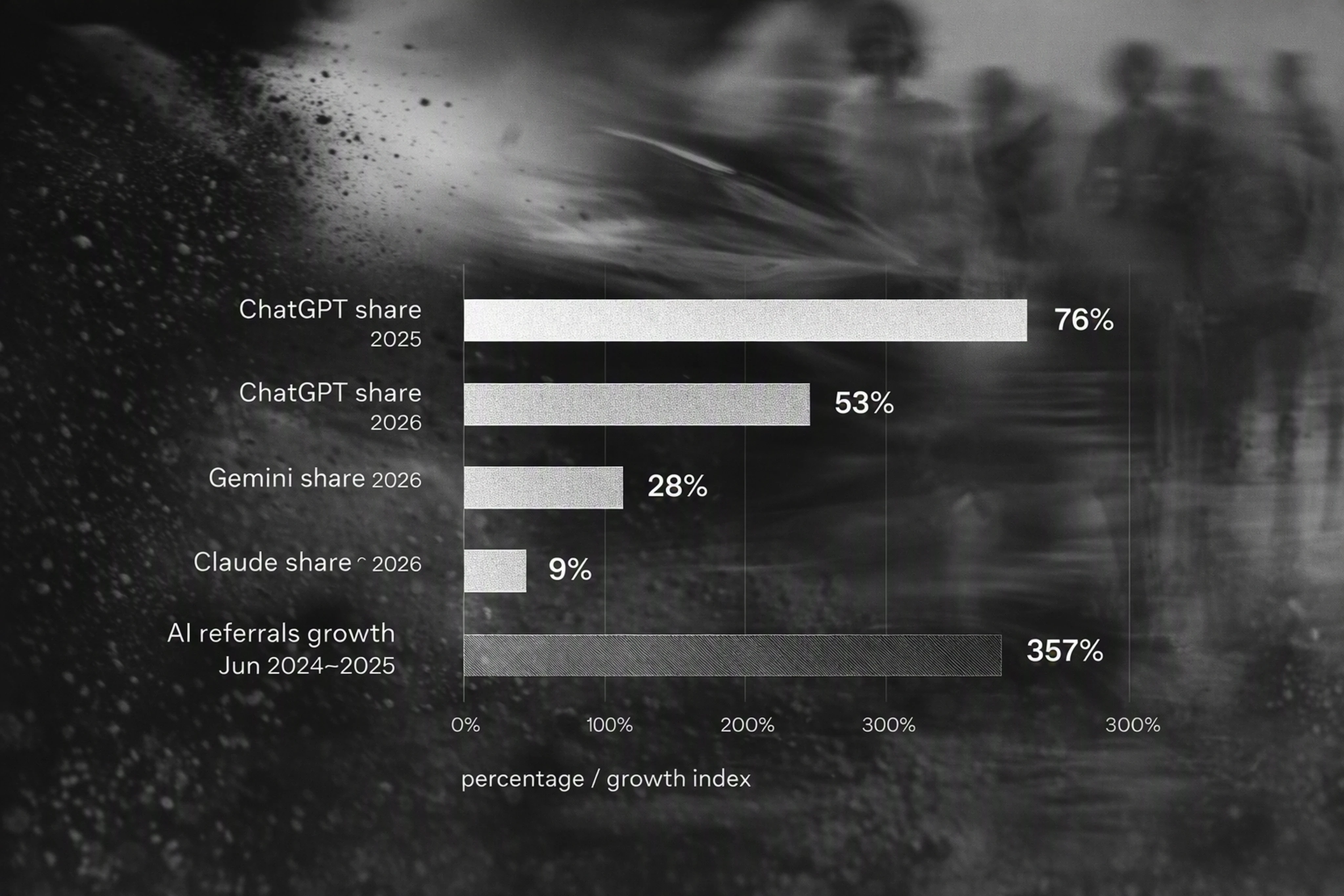
Adobe found U.S. web traffic from AI-driven referrals grew 10x between July 2024 and February 2025, and Similarweb reported over 1.1B AI referral visits in June 2025, with about 7% conversion on transactional sites.
If you don’t track brand mentions in AI assistants and attribute referral traffic accurately, you’re already flying blind.
This step-by-step tutorial shows you how to:
Detect AI-driven referrals in your analytics
Tag sessions from ChatGPT, Claude, Gemini, Perplexity, and others
Connect those sessions to specific brand mentions in LLM responses
Build an AI referral dashboard for your marketing and ecommerce teams
For deeper context and KPI frameworks, see the related pillar guide: AI Recommendation Analytics: Measuring Referral Traffic from LLM Mentions (link internally from your blog).
Prerequisites: What You Need Before You Start
Before you instrument AI referral tracking, confirm these basics.
1. Analytics Stack Readiness
You’ll need:
Google Analytics 4 (GA4) or equivalent analytics platform
Admin access to configure:
UTM parameters
Custom channel groups
Events and dimensions
Google Analytics notes that session source/medium and UTM parameters are the core building blocks for attribution.
2. Tag Management & Data Layer
You should have:
A tag manager (Google Tag Manager or similar)
A standardized data layer for:
Page metadata
Campaign params
User events (add-to-cart, checkout, etc.)
3. Access to AI Recommendations
To connect brand mentions to traffic, you need visibility into:
Your brand’s presence in ChatGPT, Claude, Gemini, Perplexity and other engines
The exact prompts and answers that include your brand
You can gather this via:
Manual testing and prompt logs
An AI visibility platform like Era, which tracks:
Share of voice in AI answers
Rankings and citations
Pros/cons and sentiment
SKU-level inclusion in shopping carousels
Step 1: Define AI Referral Sources and Naming Conventions
Start by clearly defining how you’ll recognize AI referrals.
This makes later analysis and dashboarding consistent.
1.1 List Your AI Assistants
Create a simple table of AI engines you care about:
ChatGPT (web + apps)
Claude
Gemini (Search + AI Mode)
Perplexity
Other AI search and shopping agents relevant to your market
Similarweb’s 2026 data shows ChatGPT’s share of gen AI web traffic dropped from ~76% to ~53%, while Gemini rose to ~27–28% and Claude to ~9%—multi-model tracking is now mandatory.
1.2 Standardize UTM source and medium
Use clear, machine-readable names so your reports are unambiguous.
Recommended conventions:
utm_source=chatgpt.comutm_source=claude.aiutm_source=gemini.google.comutm_source=perplexity.aiutm_medium=ai_referral
OpenAI explicitly documents that ChatGPT search referrals include utm_source=chatgpt.com, so aligning with this convention avoids confusion.
1.3 Create an AI Campaign Taxonomy
Define how you’ll use utm_campaign and utm_content:
utm_campaign=ai_recommendationfor organic AI mentionsutm_campaign=ai_integrationfor embedded tools or pluginsutm_content=brand_mentionfor general brand recommendationssku_12345for specific product/SKU recommendationsquery_best_running_shoesfor prompt-level detail
This structure lets you connect traffic to specific brand mentions and queries later.
Step 2: Detect and Tag AI-Driven Sessions in GA4
Now instrument GA4 so AI referrals are reliably detected and tagged.
2.1 Capture UTM Parameters on Landing
Ensure your analytics and tag manager capture:
session_source / mediumfirst_user_source / mediumAll UTM parameters
In GA4:
Confirm session source/medium and first user source/medium are exposed in your standard reports
Validate that visits from ChatGPT links show
source=chatgpt.comwhen UTMs are present
Ahrefs notes that AI traffic is still underestimated, with some visits appearing as “direct,” so consistent UTM tagging is essential.
2.2 Create a Custom Channel Group for AI Traffic
Use GA4’s custom channel groups to classify AI referrals.
Steps:
Go to Admin → Data Settings → Channel Groups
Create a new channel group:
AI AssistantsAdd rules such as:
If
sourceequalschatgpt.com→ Channel:AI – ChatGPTIf
sourceequalsclaude.ai→ Channel:AI – ClaudeIf
mediumequalsai_referral→ Channel:AI – Other
This makes AI traffic visible alongside Paid, Organic, and Direct in every report.
2.3 Track AI Referral Events
Create a custom event that fires for every AI referral session.
Example using GA4 + GTM:
Trigger: Pageview where:
sourcein['chatgpt.com', 'claude.ai', 'gemini.google.com', 'perplexity.ai']OR
mediumequalsai_referral
Event name:
ai_referral_sessionEvent parameters:
ai_engine(ChatGPT, Claude, Gemini, Perplexity)ai_query(if available from URL or additional tagging)ai_recommendation_type(brand_mention, sku_recommendation, comparison, etc.)
This event is the backbone of your AI referral dashboard and funnels.
Step 3: Instrument AI Referral Links and Deep Links
Attribution depends on the links AI assistants use.
You can’t control every engine, but you can influence and instrument many of them.
3.1 Optimize Links in AI Integrations and Tools
If you run:
ChatGPT or Claude apps/plugins
Gemini or Perplexity integrations
Make sure outgoing links include:
utm_sourceset to the host assistant (e.g.,chatgpt.com,claude.ai)utm_medium=ai_referralutm_campaignandutm_contentaligned with your taxonomy
Example URL:
https://yourbrand.com/running-shoes?utm_source=chatgpt.com&utm_medium=ai_referral&utm_campaign=ai_recommendation&utm_content=sku_98765
https://yourbrand.com/running-shoes?utm_source=chatgpt.com&utm_medium=ai_referral&utm_campaign=ai_recommendation&utm_content=sku_98765
3.2 Encourage AI Assistants to Use Trackable URLs
For assistants you don’t directly control, you can:
Ensure your canonical URLs support UTM parameters cleanly
Use well-structured landing pages that AI engines are likely to cite
Document your preferred tracking URLs in developer docs or API responses when you expose product data
Cloudflare found that AI bots generate massive crawl volumes (e.g., 38,000 crawls per visitor for Anthropic in July 2025), so clean, structured URLs increase the chances that assistants link predictably.
3.3 Handle “Direct” AI Traffic Edge Cases
Ahrefs reports that AI chatbots account for about 0.1% of traffic across ~35K sites and that this is likely understated because some AI traffic appears as direct.
Mitigation tactics:
Analyze spikes in direct traffic that correlate with:
AI crawling activity
Known campaign pushes involving AI
Use landing page grouping to identify pages predominantly reached via AI mentions
Treat these as “probable AI referrals” and monitor them separately
This isn’t perfect attribution, but it gives you directional insight beyond standard channels.
Step 4: Connect AI Brand Mentions to On-Site Behavior
Tracking sessions is only half the equation.
You need to tie those sessions back to specific brand mentions and decision-stage queries.
4.1 Capture Prompt and Answer Context (Where Possible)
For AI surfaces you own (e.g., plugins, apps, shopping agents):
Log:
User prompts (e.g., “best wireless earbuds under $200”)
Model answers that include your brand or SKUs
The rank and role of your brand in the answer (primary recommendation vs one of many)
Store this in:
Your own database
A data warehouse (BigQuery, Snowflake)
Connect each recommendation to:
A landing URL
A UTM-tagged click event
4.2 Use an AI Visibility Layer to Track Mentions Across Engines
Manual logging won’t scale across ChatGPT, Claude, Gemini, Perplexity, and emerging agents.
Platforms like Era provide:
Multi-model monitoring of your brand’s share of voice
Answer-level analytics:
Where your brand appears
How it’s positioned (pros, cons, sentiment)
Which SKUs and merchants are recommended
Region and language filters so you can see differences in U.S., EU, etc.
You can then:
Export Era’s AI recommendation data via API
Join it to your GA4 events by:
ai_engineai_queryskuor product IDs
This creates a closed-loop view from AI mention → click → on-site behavior → revenue.
4.3 Build Decision-Criteria Attribution
Ahrefs found that AI citations don’t mirror Google rankings:
28% of ChatGPT’s most-cited pages have zero Google organic visibility
80% of sources cited across AI platforms are not in Google
This means AI assistants use different evidence than traditional SEO.
To interpret performance:
Map AI decision criteria for your category:
Price and promotions
Availability and shipping speed
Trust signals (reviews, ratings, guarantees)
Specs and compatibility
Annotate each AI recommendation with these criteria
Compare on-site behavior:
Do AI referrals driven by “best value” convert differently than those driven by “premium quality”?
Over time, this helps you prioritize which evidence types to strengthen in your catalogue and content.
Step 5: Build an AI Referral Dashboard for ChatGPT, Claude, Gemini & More
With data flowing, you can build a practical AI referral dashboard.
5.1 Core Metrics to Include
Align your dashboard to the KPI stack emerging across AI visibility tools.
At minimum, track:
AI referral sessions
Per engine (ChatGPT, Claude, Gemini, Perplexity)
Per region and device
Share of AI traffic
% of total sessions from AI assistants
Conversion metrics
Add-to-cart, checkout, revenue per session
Compare against other channels (Organic, Paid, etc.)
Brand mention metrics (via Era or your logs)
Number of answers where your brand is recommended
Position (1st, 2nd, etc.) in recommendation lists
Sentiment and pros/cons
5.2 Example GA4 Exploration Layout
Use GA4’s Explore workspace to build a dedicated AI Referral Exploration.
Recommended tabs:
Traffic Overview
Rows:
ai_engine,countryColumns:
sessions,users,ai_referral_sessionevents
Conversion by Engine
Rows:
ai_engineMetrics:
purchases,revenue,conversion_rate
Landing Page Performance
Rows:
landing_pageFilters:
channel=AI – ChatGPT,AI – Claude, etc.
5.3 Join AI Recommendation Data in a Warehouse
For deeper attribution, push your GA4 data to BigQuery and join it with AI recommendation logs.
Data model example:
Table
ai_recommendations(from Era/API):timestampai_engineai_querybrandskupositionsentiment
Table
ai_sessions(from GA4 export):session_idai_engineutm_contentlanding_pagerevenue
Join on:
ai_engineskuorutm_contentwhere you encode SKUTime windows (e.g., recommendation within 24h of session)
This lets you answer questions like:
“Which Claude queries produce the highest revenue per session?”
“Where does Gemini recommend competitors over us, and what’s the impact?”
Step 6: Replace Legacy SEO Dashboards with AI-Focused Reporting
Traditional SEO dashboards don’t reflect how AI models surface brands in conversation.
Pew found that when Google users see an AI-generated summary, they click traditional search results in 8% of visits vs 15% when no summary appears.
Users rarely click cited sources inside the summary.
This shifts discovery into AI answer layers, not classic SERPs.
6.1 Expand Beyond Rankings and Organic Sessions
Your core SEO dashboards should now include:
AI share of voice in ChatGPT, Claude, Gemini, Perplexity
AI referral traffic and revenue alongside organic search
AI citations vs Google rankings (to see the disconnect Ahrefs highlights)
6.2 Introduce AI Visibility KPIs
Borrow from AI visibility platforms like Era:
Answer presence rate: % of relevant AI queries where your brand appears
Recommendation rank: average position in AI recommendations
Evidence completeness: coverage of key decision criteria in your catalogue and content
Tie these directly to:
SKU-level performance
Region-specific AI visibility
6.3 Operationalize AI GEO/AEO Programs
Use your new dashboard to drive ongoing Generative Engine Optimization (GEO) and Answer Engine Optimization (AEO) programs:
Identify SKUs that appear frequently in AI answers but underperform on-site
Fix:
Product page specs and clarity
Pricing and shipping competitiveness
Review volume and rating displays
Feed improvements back into AI via:
Structured data and feeds
Updated content and landing pages
Era’s GEO plans and content autopilot can help automate:
Query discovery across AI assistants
Daily AI-optimized articles published directly to your CMS
Technical GEO tasks aligned with how LLMs consume data
This moves AI visibility from an experiment to a predictable, revenue-linked program.
FAQ: Tracking Brand Mentions in AI and Referral Traffic
1. How can I tell if traffic is coming from ChatGPT or Claude?
You can detect AI-driven referrals primarily through UTM parameters and source/medium.
OpenAI says ChatGPT referrals include utm_source=chatgpt.com, and you can align Claude, Gemini, and Perplexity similarly.
Create a custom channel group in GA4 that classifies any session with source equal to these domains or medium=ai_referral as AI traffic.
2. What if AI referral visits show up as “direct” in analytics?
Ahrefs’ research suggests some AI traffic is misclassified as direct.
To mitigate this:
Use UTM parameters wherever you control links
Monitor landing pages that see unexplained direct traffic spikes following AI crawling or campaigns
Treat these clusters as probable AI referrals and track them in a separate view
It won’t be perfect, but it improves visibility beyond default reports.
3. Are AI brand mentions and AI referral traffic the same thing?
No.
Brand mentions measure how often and how prominently AI assistants recommend your brand.
Referral traffic measures how many users click through to your site.
Ahrefs found that 28% of ChatGPT’s most-cited pages have zero Google organic visibility and 80% of AI-cited sources don’t appear in Google, so AI visibility is a distinct layer.
You need both metrics to understand the full picture.
4. Which tools help track brand mentions in AI assistants?
You can combine:
Analytics platforms (GA4) for traffic and conversions
AI visibility platforms like Era to:
Monitor brand mentions in ChatGPT, Claude, Gemini, Perplexity
Track share of voice, rankings, sentiment, and pros/cons
Provide SKU-level and merchant-level tracking for ecommerce
Together, they create a closed-loop AI recommendation analytics stack.
5. How does this tie into GEO/AEO and my broader SEO strategy?
Google says AI Overviews and AI Mode are grounded in core ranking systems and don’t require special optimization beyond strong SEO fundamentals.
However, AI assistants use additional signals: structured data, catalogue hygiene, reviews, and brand authority.
GEO/AEO focuses on exposing machine-readable evidence across these surfaces.
By tracking AI referrals and brand mentions, you can identify which evidence gaps to fix and prioritize GEO work that actually moves revenue and P&L, not just rankings.
By following these steps—defining AI sources, tagging sessions, instrumenting AI links, connecting mentions to behavior, and building AI-focused dashboards—you’ll be ready for the era where AI answer engines and shopping agents become the new front door for product discovery.
And with platforms like Era providing multi-model AI visibility and optimization, you can move from guessing about AI to operating it as a measurable, optimizable channel.




Overview: Why AI Referral Tracking Now Matters
AI assistants are now a real acquisition channel.
Adobe found U.S. web traffic from AI-driven referrals grew 10x between July 2024 and February 2025, and Similarweb reported over 1.1B AI referral visits in June 2025, with about 7% conversion on transactional sites.
If you don’t track brand mentions in AI assistants and attribute referral traffic accurately, you’re already flying blind.
This step-by-step tutorial shows you how to:
Detect AI-driven referrals in your analytics
Tag sessions from ChatGPT, Claude, Gemini, Perplexity, and others
Connect those sessions to specific brand mentions in LLM responses
Build an AI referral dashboard for your marketing and ecommerce teams
For deeper context and KPI frameworks, see the related pillar guide: AI Recommendation Analytics: Measuring Referral Traffic from LLM Mentions (link internally from your blog).
Prerequisites: What You Need Before You Start
Before you instrument AI referral tracking, confirm these basics.
1. Analytics Stack Readiness
You’ll need:
Google Analytics 4 (GA4) or equivalent analytics platform
Admin access to configure:
UTM parameters
Custom channel groups
Events and dimensions
Google Analytics notes that session source/medium and UTM parameters are the core building blocks for attribution.
2. Tag Management & Data Layer
You should have:
A tag manager (Google Tag Manager or similar)
A standardized data layer for:
Page metadata
Campaign params
User events (add-to-cart, checkout, etc.)
3. Access to AI Recommendations
To connect brand mentions to traffic, you need visibility into:
Your brand’s presence in ChatGPT, Claude, Gemini, Perplexity and other engines
The exact prompts and answers that include your brand
You can gather this via:
Manual testing and prompt logs
An AI visibility platform like Era, which tracks:
Share of voice in AI answers
Rankings and citations
Pros/cons and sentiment
SKU-level inclusion in shopping carousels
Step 1: Define AI Referral Sources and Naming Conventions
Start by clearly defining how you’ll recognize AI referrals.
This makes later analysis and dashboarding consistent.
1.1 List Your AI Assistants
Create a simple table of AI engines you care about:
ChatGPT (web + apps)
Claude
Gemini (Search + AI Mode)
Perplexity
Other AI search and shopping agents relevant to your market
Similarweb’s 2026 data shows ChatGPT’s share of gen AI web traffic dropped from ~76% to ~53%, while Gemini rose to ~27–28% and Claude to ~9%—multi-model tracking is now mandatory.
1.2 Standardize UTM source and medium
Use clear, machine-readable names so your reports are unambiguous.
Recommended conventions:
utm_source=chatgpt.comutm_source=claude.aiutm_source=gemini.google.comutm_source=perplexity.aiutm_medium=ai_referral
OpenAI explicitly documents that ChatGPT search referrals include utm_source=chatgpt.com, so aligning with this convention avoids confusion.
1.3 Create an AI Campaign Taxonomy
Define how you’ll use utm_campaign and utm_content:
utm_campaign=ai_recommendationfor organic AI mentionsutm_campaign=ai_integrationfor embedded tools or pluginsutm_content=brand_mentionfor general brand recommendationssku_12345for specific product/SKU recommendationsquery_best_running_shoesfor prompt-level detail
This structure lets you connect traffic to specific brand mentions and queries later.
Step 2: Detect and Tag AI-Driven Sessions in GA4
Now instrument GA4 so AI referrals are reliably detected and tagged.
2.1 Capture UTM Parameters on Landing
Ensure your analytics and tag manager capture:
session_source / mediumfirst_user_source / mediumAll UTM parameters
In GA4:
Confirm session source/medium and first user source/medium are exposed in your standard reports
Validate that visits from ChatGPT links show
source=chatgpt.comwhen UTMs are present
Ahrefs notes that AI traffic is still underestimated, with some visits appearing as “direct,” so consistent UTM tagging is essential.
2.2 Create a Custom Channel Group for AI Traffic
Use GA4’s custom channel groups to classify AI referrals.
Steps:
Go to Admin → Data Settings → Channel Groups
Create a new channel group:
AI AssistantsAdd rules such as:
If
sourceequalschatgpt.com→ Channel:AI – ChatGPTIf
sourceequalsclaude.ai→ Channel:AI – ClaudeIf
mediumequalsai_referral→ Channel:AI – Other
This makes AI traffic visible alongside Paid, Organic, and Direct in every report.
2.3 Track AI Referral Events
Create a custom event that fires for every AI referral session.
Example using GA4 + GTM:
Trigger: Pageview where:
sourcein['chatgpt.com', 'claude.ai', 'gemini.google.com', 'perplexity.ai']OR
mediumequalsai_referral
Event name:
ai_referral_sessionEvent parameters:
ai_engine(ChatGPT, Claude, Gemini, Perplexity)ai_query(if available from URL or additional tagging)ai_recommendation_type(brand_mention, sku_recommendation, comparison, etc.)
This event is the backbone of your AI referral dashboard and funnels.
Step 3: Instrument AI Referral Links and Deep Links
Attribution depends on the links AI assistants use.
You can’t control every engine, but you can influence and instrument many of them.
3.1 Optimize Links in AI Integrations and Tools
If you run:
ChatGPT or Claude apps/plugins
Gemini or Perplexity integrations
Make sure outgoing links include:
utm_sourceset to the host assistant (e.g.,chatgpt.com,claude.ai)utm_medium=ai_referralutm_campaignandutm_contentaligned with your taxonomy
Example URL:
https://yourbrand.com/running-shoes?utm_source=chatgpt.com&utm_medium=ai_referral&utm_campaign=ai_recommendation&utm_content=sku_98765
3.2 Encourage AI Assistants to Use Trackable URLs
For assistants you don’t directly control, you can:
Ensure your canonical URLs support UTM parameters cleanly
Use well-structured landing pages that AI engines are likely to cite
Document your preferred tracking URLs in developer docs or API responses when you expose product data
Cloudflare found that AI bots generate massive crawl volumes (e.g., 38,000 crawls per visitor for Anthropic in July 2025), so clean, structured URLs increase the chances that assistants link predictably.
3.3 Handle “Direct” AI Traffic Edge Cases
Ahrefs reports that AI chatbots account for about 0.1% of traffic across ~35K sites and that this is likely understated because some AI traffic appears as direct.
Mitigation tactics:
Analyze spikes in direct traffic that correlate with:
AI crawling activity
Known campaign pushes involving AI
Use landing page grouping to identify pages predominantly reached via AI mentions
Treat these as “probable AI referrals” and monitor them separately
This isn’t perfect attribution, but it gives you directional insight beyond standard channels.
Step 4: Connect AI Brand Mentions to On-Site Behavior
Tracking sessions is only half the equation.
You need to tie those sessions back to specific brand mentions and decision-stage queries.
4.1 Capture Prompt and Answer Context (Where Possible)
For AI surfaces you own (e.g., plugins, apps, shopping agents):
Log:
User prompts (e.g., “best wireless earbuds under $200”)
Model answers that include your brand or SKUs
The rank and role of your brand in the answer (primary recommendation vs one of many)
Store this in:
Your own database
A data warehouse (BigQuery, Snowflake)
Connect each recommendation to:
A landing URL
A UTM-tagged click event
4.2 Use an AI Visibility Layer to Track Mentions Across Engines
Manual logging won’t scale across ChatGPT, Claude, Gemini, Perplexity, and emerging agents.
Platforms like Era provide:
Multi-model monitoring of your brand’s share of voice
Answer-level analytics:
Where your brand appears
How it’s positioned (pros, cons, sentiment)
Which SKUs and merchants are recommended
Region and language filters so you can see differences in U.S., EU, etc.
You can then:
Export Era’s AI recommendation data via API
Join it to your GA4 events by:
ai_engineai_queryskuor product IDs
This creates a closed-loop view from AI mention → click → on-site behavior → revenue.
4.3 Build Decision-Criteria Attribution
Ahrefs found that AI citations don’t mirror Google rankings:
28% of ChatGPT’s most-cited pages have zero Google organic visibility
80% of sources cited across AI platforms are not in Google
This means AI assistants use different evidence than traditional SEO.
To interpret performance:
Map AI decision criteria for your category:
Price and promotions
Availability and shipping speed
Trust signals (reviews, ratings, guarantees)
Specs and compatibility
Annotate each AI recommendation with these criteria
Compare on-site behavior:
Do AI referrals driven by “best value” convert differently than those driven by “premium quality”?
Over time, this helps you prioritize which evidence types to strengthen in your catalogue and content.
Step 5: Build an AI Referral Dashboard for ChatGPT, Claude, Gemini & More
With data flowing, you can build a practical AI referral dashboard.
5.1 Core Metrics to Include
Align your dashboard to the KPI stack emerging across AI visibility tools.
At minimum, track:
AI referral sessions
Per engine (ChatGPT, Claude, Gemini, Perplexity)
Per region and device
Share of AI traffic
% of total sessions from AI assistants
Conversion metrics
Add-to-cart, checkout, revenue per session
Compare against other channels (Organic, Paid, etc.)
Brand mention metrics (via Era or your logs)
Number of answers where your brand is recommended
Position (1st, 2nd, etc.) in recommendation lists
Sentiment and pros/cons
5.2 Example GA4 Exploration Layout
Use GA4’s Explore workspace to build a dedicated AI Referral Exploration.
Recommended tabs:
Traffic Overview
Rows:
ai_engine,countryColumns:
sessions,users,ai_referral_sessionevents
Conversion by Engine
Rows:
ai_engineMetrics:
purchases,revenue,conversion_rate
Landing Page Performance
Rows:
landing_pageFilters:
channel=AI – ChatGPT,AI – Claude, etc.
5.3 Join AI Recommendation Data in a Warehouse
For deeper attribution, push your GA4 data to BigQuery and join it with AI recommendation logs.
Data model example:
Table
ai_recommendations(from Era/API):timestampai_engineai_querybrandskupositionsentiment
Table
ai_sessions(from GA4 export):session_idai_engineutm_contentlanding_pagerevenue
Join on:
ai_engineskuorutm_contentwhere you encode SKUTime windows (e.g., recommendation within 24h of session)
This lets you answer questions like:
“Which Claude queries produce the highest revenue per session?”
“Where does Gemini recommend competitors over us, and what’s the impact?”
Step 6: Replace Legacy SEO Dashboards with AI-Focused Reporting
Traditional SEO dashboards don’t reflect how AI models surface brands in conversation.
Pew found that when Google users see an AI-generated summary, they click traditional search results in 8% of visits vs 15% when no summary appears.
Users rarely click cited sources inside the summary.
This shifts discovery into AI answer layers, not classic SERPs.
6.1 Expand Beyond Rankings and Organic Sessions
Your core SEO dashboards should now include:
AI share of voice in ChatGPT, Claude, Gemini, Perplexity
AI referral traffic and revenue alongside organic search
AI citations vs Google rankings (to see the disconnect Ahrefs highlights)
6.2 Introduce AI Visibility KPIs
Borrow from AI visibility platforms like Era:
Answer presence rate: % of relevant AI queries where your brand appears
Recommendation rank: average position in AI recommendations
Evidence completeness: coverage of key decision criteria in your catalogue and content
Tie these directly to:
SKU-level performance
Region-specific AI visibility
6.3 Operationalize AI GEO/AEO Programs
Use your new dashboard to drive ongoing Generative Engine Optimization (GEO) and Answer Engine Optimization (AEO) programs:
Identify SKUs that appear frequently in AI answers but underperform on-site
Fix:
Product page specs and clarity
Pricing and shipping competitiveness
Review volume and rating displays
Feed improvements back into AI via:
Structured data and feeds
Updated content and landing pages
Era’s GEO plans and content autopilot can help automate:
Query discovery across AI assistants
Daily AI-optimized articles published directly to your CMS
Technical GEO tasks aligned with how LLMs consume data
This moves AI visibility from an experiment to a predictable, revenue-linked program.
FAQ: Tracking Brand Mentions in AI and Referral Traffic
1. How can I tell if traffic is coming from ChatGPT or Claude?
You can detect AI-driven referrals primarily through UTM parameters and source/medium.
OpenAI says ChatGPT referrals include utm_source=chatgpt.com, and you can align Claude, Gemini, and Perplexity similarly.
Create a custom channel group in GA4 that classifies any session with source equal to these domains or medium=ai_referral as AI traffic.
2. What if AI referral visits show up as “direct” in analytics?
Ahrefs’ research suggests some AI traffic is misclassified as direct.
To mitigate this:
Use UTM parameters wherever you control links
Monitor landing pages that see unexplained direct traffic spikes following AI crawling or campaigns
Treat these clusters as probable AI referrals and track them in a separate view
It won’t be perfect, but it improves visibility beyond default reports.
3. Are AI brand mentions and AI referral traffic the same thing?
No.
Brand mentions measure how often and how prominently AI assistants recommend your brand.
Referral traffic measures how many users click through to your site.
Ahrefs found that 28% of ChatGPT’s most-cited pages have zero Google organic visibility and 80% of AI-cited sources don’t appear in Google, so AI visibility is a distinct layer.
You need both metrics to understand the full picture.
4. Which tools help track brand mentions in AI assistants?
You can combine:
Analytics platforms (GA4) for traffic and conversions
AI visibility platforms like Era to:
Monitor brand mentions in ChatGPT, Claude, Gemini, Perplexity
Track share of voice, rankings, sentiment, and pros/cons
Provide SKU-level and merchant-level tracking for ecommerce
Together, they create a closed-loop AI recommendation analytics stack.
5. How does this tie into GEO/AEO and my broader SEO strategy?
Google says AI Overviews and AI Mode are grounded in core ranking systems and don’t require special optimization beyond strong SEO fundamentals.
However, AI assistants use additional signals: structured data, catalogue hygiene, reviews, and brand authority.
GEO/AEO focuses on exposing machine-readable evidence across these surfaces.
By tracking AI referrals and brand mentions, you can identify which evidence gaps to fix and prioritize GEO work that actually moves revenue and P&L, not just rankings.
By following these steps—defining AI sources, tagging sessions, instrumenting AI links, connecting mentions to behavior, and building AI-focused dashboards—you’ll be ready for the era where AI answer engines and shopping agents become the new front door for product discovery.
And with platforms like Era providing multi-model AI visibility and optimization, you can move from guessing about AI to operating it as a measurable, optimizable channel.