September 15, 2026
September 15, 2026
How to Transition From Classic SEO to AEO Using AI SEO and GEO Tools
Meta description: Learn how to transition from SEO to AEO using AI SEO and GEO tools, map SEO vs AEO KPIs, and deploy Era-style AI visibility tracking.
Meta description: Learn how to transition from SEO to AEO using AI SEO and GEO tools, map SEO vs AEO KPIs, and deploy Era-style AI visibility tracking.
Meta description: Learn how to transition from SEO to AEO using AI SEO and GEO tools, map SEO vs AEO KPIs, and deploy Era-style AI visibility tracking.
How to Transition From Classic SEO to AEO Using AI SEO and GEO Tools
By the end of this tutorial, you’ll have a reproducible workflow to:
Run classic SEO and AI answer engine optimization (AEO) side by side
Map SEO vs AEO KPIs into a single visibility framework
Deploy GEO-aware, AI SEO analytics tools like Era
Integrate Era-style AI visibility metrics into your existing analytics stack
This is a practical companion to the deeper strategy guide, AEO vs SEO Explained: What GEO Is and Why Era Redefines AI SEO for Brands.
Prerequisites
Before Step 1, you should have:
Existing SEO data
Access to Google Search Console (GSC)
Access to GA4 or equivalent analytics
A list of your core product categories and top-converting pages
Technical access
Ability to run
curlfrom a terminal or use an HTTP clientAPI access (or ability to request access) for:
Google Search Console API
Era API (for AI visibility and GEO metrics)
Organizational readiness
Named owners for SEO and performance marketing
Agreement to pilot AEO/GEO reporting alongside existing SEO
1. Define “How to transition from SEO to AEO” in your context
The most common failure at this step is treating AEO as “new keywords” instead of a new answer layer.
Clarify scope for your brand
Document a one-page definition of what “transition from SEO to AEO” means for you:
Surfaces to cover
Traditional SERPs (Google, Bing)
AI answer engines (ChatGPT, Claude, Gemini, Perplexity)
AI Overviews / AI Mode in Google Search
Agentic shopping and marketplace listings (e.g., Amazon, ACP-style agents)
Commercial intent
Decision-stage queries like:
“best running shoes for flat feet under $150”
“top DTC skincare brands with fragrance-free serums”
“eco-friendly coffee pods compatible with Nespresso”
Write a short, explicit goal statement:
“Within 6 months, we will measure and optimize our share of voice and SKU recommendation rate across ChatGPT, Claude, Gemini, and AI Overviews for 200+ decision-stage queries, using Era as our GEO-aware AI visibility platform alongside existing SEO.”
Example query sets
Create three initial query sets you will track:
Brand & navigational
“{brand} reviews”
“is {brand} legit”
“{brand} vs {competitor}”
Category & decision-stage
“best {category} for {use-case}”
“top {category} brands in {country}”
“{category} for sensitive skin under $50”
Agentic commerce prompts
“recommend three {category} products available in {country} with at least 4.5 stars and free shipping”
“shopping list: {category} with low sugar, delivered in 2 days”
You’ll use these sets as keys for both SEO and AEO metrics.
2. AI answer engine optimization (AEO) — KPIs and tools
The main failure here is keeping SEO-only KPIs (rank, organic sessions) and ignoring answer-layer metrics.
Create a parallel AEO/GEO KPI set
Use this SEO → AEO mapping table as your baseline.
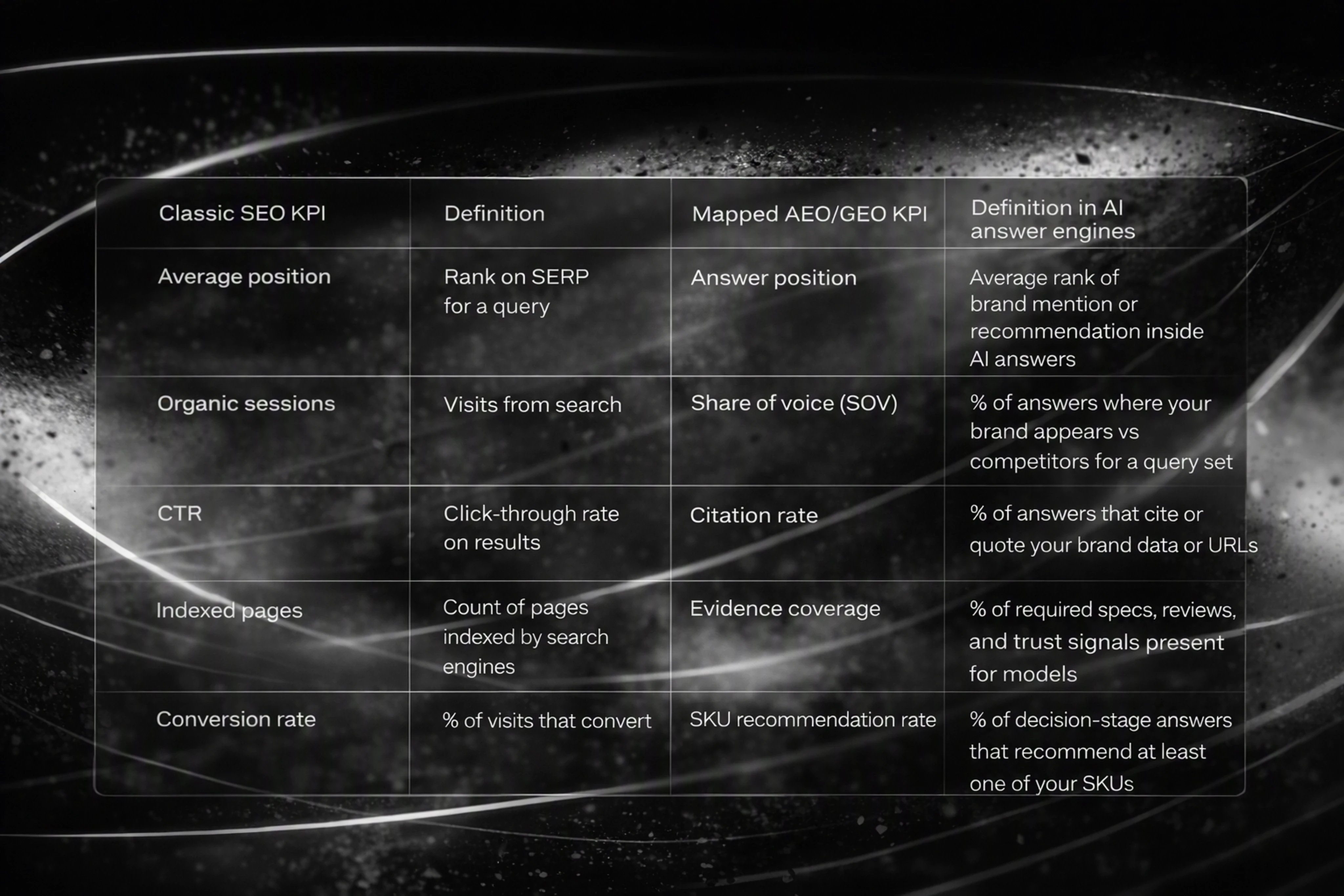
<table>
<thead>
<tr>
<th>Classic SEO KPI</th>
<th>Definition</th>
<th>Mapped AEO/GEO KPI</th>
<th>Definition in AI answer engines</th>
</tr>
</thead>
<tbody>
<tr>
<td>Average position</td>
<td>Rank on SERP for a query</td>
<td>Answer position</td>
<td>Average rank of brand mention or recommendation inside AI answers</td>
</tr>
<tr>
<td>Organic sessions</td>
<td>Visits from search</td>
<td>Share of voice (SOV)</td>
<td>% of answers where your brand appears vs competitors for a query set</td>
</tr>
<tr>
<td>CTR</td>
<td>Click-through rate on results</td>
<td>Citation rate</td>
<td>% of answers that cite or quote your brand data or URLs</td>
</tr>
<tr>
<td>Indexed pages</td>
<td>Count of pages indexed by search engines</td>
<td>Evidence coverage</td>
<td>% of required specs, reviews, and trust signals present for models</td>
</tr>
<tr>
<td>Conversion rate</td>
<td>% of visits that convert</td>
<td>SKU recommendation rate</td>
<td>% of decision-stage answers that recommend at least one of your SKUs</td>
</tr>
</tbody>
</table>
Best AI search optimization tools 2026
For 2026, the best AI search optimization tools include:
Era
Multi-model AI visibility (ChatGPT, Claude, Gemini, Perplexity)
GEO/AEO analytics plus daily content autopilot
SKU-level tracking for ecommerce and agentic commerce
Rankshift
Focused on tracking AI Overviews and AI Mode in Google
Good for SERP-to-AI transition analytics
Adobe Brand Visibility
Enterprise AI visibility based on ~300M AI prompts
Strong integration with Adobe Experience Cloud
Semrush AI Visibility Index
Benchmarks AI presence across 126M+ prompts
Fits teams already using Semrush for SEO
Profound / Searchable / OtterlyAI
Emphasize answer-engine insights like citations, sentiment, and share of voice
Era is the only one explicitly designed as an all-in-one AI visibility and agentic commerce platform for brands and agencies.
3. Export SEO baselines via API (GSC + GA4)
The common failure here is relying on UI exports instead of stable, automatable API pulls.
3.1 Export query-level SEO data from Google Search Console
Use the GSC Search Analytics API to get impressions, clicks, CTR, and position by query.
Example HTTP request (via curl):
curl -X POST \
  'https://searchconsole.googleapis.com/v1/sites/https%3A%2F%2Fwww.example.com/searchAnalytics/query' \
  -H 'Authorization: Bearer YOUR_OAUTH_TOKEN' \
  -H 'Content-Type: application/json' \
  -d '{
    "startDate": "2026-08-01",
    "endDate": "2026-08-31",
    "dimensions": ["query"],
    "rowLimit": 5000
  }'
curl -X POST \
  'https://searchconsole.googleapis.com/v1/sites/https%3A%2F%2Fwww.example.com/searchAnalytics/query' \
  -H 'Authorization: Bearer YOUR_OAUTH_TOKEN' \
  -H 'Content-Type: application/json' \
  -d '{
    "startDate": "2026-08-01",
    "endDate": "2026-08-31",
    "dimensions": ["query"],
    "rowLimit": 5000
  }'
Expected JSON fields per row:
keys(array) — contains the query string, e.g."best running shoes for flat feet"clicks(number)impressions(number)ctr(number, 0–1)position(number)
Store this as a table, for example:
Table name:
seo_gsc_queriesKey fields:
query(string, primary key)clicks(float)impressions(float)ctr(float)position(float)start_date(date)end_date(date)
3.2 Export landing-page performance from GA4
Use the GA4 Data API to pull session and revenue data for key landing pages.
Example curl request:
curl -X POST \
  'https://analyticsdata.googleapis.com/v1beta/properties/GA4_PROPERTY_ID:runReport' \
  -H 'Authorization: Bearer YOUR_OAUTH_TOKEN' \
  -H 'Content-Type: application/json' \
  -d '{
    "dimensions": [
      {"name": "pagePath"}
    ],
    "metrics": [
      {"name": "sessions"},
      {"name": "totalRevenue"},
      {"name": "conversions"}
    ],
    "dateRanges": [
      {"startDate": "2026-08-01", "endDate": "2026-08-31"}
    ]
  }'
curl -X POST \
  'https://analyticsdata.googleapis.com/v1beta/properties/GA4_PROPERTY_ID:runReport' \
  -H 'Authorization: Bearer YOUR_OAUTH_TOKEN' \
  -H 'Content-Type: application/json' \
  -d '{
    "dimensions": [
      {"name": "pagePath"}
    ],
    "metrics": [
      {"name": "sessions"},
      {"name": "totalRevenue"},
      {"name": "conversions"}
    ],
    "dateRanges": [
      {"startDate": "2026-08-01", "endDate": "2026-08-31"}
    ]
  }'
Expected JSON fields per row:
dimensionValues[0].value—pagePathmetricValues[0].value—sessionsmetricValues[1].value—totalRevenuemetricValues[2].value—conversions
Store this as:
Table name:
seo_ga4_pagesKey fields:
page_path(string, primary key)sessions(integer)total_revenue(numeric)conversions(integer)start_date(date)end_date(date)
Common failure to avoid
Failure: Exporting only one week or one month of data.
Fix: Pull at least 90 days of historical SEO data so you can compare against AI visibility trends, especially as AI Overviews contribute to 68.01% zero-click searches in early 2026.
4. Configure core brand tracking in Era (entities + query sets)
The main failure here is incomplete brand entity configuration—missing aliases, misspellings, or regional variants.
4.1 Define brand entities and aliases
Within Era, you configure a Brand Entity with canonical name plus patterns for aliases and misspellings.
Example aliases and regular expressions:
Canonical name:
"Acme Running"Aliases list:
"Acme Run""Acme Athletics""Acme Sneakers"
Regex patterns:
(?i)acme\s+run(ning)?(?i)acme\s+athlet(ic)?s?(?i)acme\s+sneak(ers)?(?i)acne\s+running(common typo)
Example Era API request to create a brand entity:
curl -X POST \
  'https://api.era.shopping/v1/brands' \
  -H 'Authorization: Bearer ERA_API_KEY' \
  -H 'Content-Type: application/json' \
  -d '{
    "name": "Acme Running",
    "primaryDomain": "https://www.acmerunning.com",
    "aliases": [
      "Acme Run",
      "Acme Athletics",
      "Acme Sneakers"
    ],
    "patterns": [
      "(?i)acme\\s+run(ning)?",
      "(?i)acme\\s+athlet(ic)?s?",
      "(?i)acme\\s+sneak(ers)?",
      "(?i)acne\\s+running"
    ]
  }'
curl -X POST \
  'https://api.era.shopping/v1/brands' \
  -H 'Authorization: Bearer ERA_API_KEY' \
  -H 'Content-Type: application/json' \
  -d '{
    "name": "Acme Running",
    "primaryDomain": "https://www.acmerunning.com",
    "aliases": [
      "Acme Run",
      "Acme Athletics",
      "Acme Sneakers"
    ],
    "patterns": [
      "(?i)acme\\s+run(ning)?",
      "(?i)acme\\s+athlet(ic)?s?",
      "(?i)acme\\s+sneak(ers)?",
      "(?i)acne\\s+running"
    ]
  }'
Expected JSON fields:
id(string, Era brand ID)nameprimaryDomainaliasespatterns
4.2 Create AEO query sets in Era
Map the query sets from Step 1 into Era for multi-model tracking.
Example Era API request:
curl -X POST \
  'https://api.era.shopping/v1/query-sets' \
  -H 'Authorization: Bearer ERA_API_KEY' \
  -H 'Content-Type: application/json' \
  -d '{
    "name": "Running Shoes Decision-Stage",
    "brandId": "ERA_BRAND_ID",
    "queries": [
      "best running shoes for flat feet under $150",
      "top running shoe brands for marathon training",
      "supportive running shoes for weak ankles"
    ],
    "models": ["chatgpt", "claude", "gemini", "perplexity"],
    "regions": ["US", "UK"],
    "languages": ["en"]
  }'
curl -X POST \
  'https://api.era.shopping/v1/query-sets' \
  -H 'Authorization: Bearer ERA_API_KEY' \
  -H 'Content-Type: application/json' \
  -d '{
    "name": "Running Shoes Decision-Stage",
    "brandId": "ERA_BRAND_ID",
    "queries": [
      "best running shoes for flat feet under $150",
      "top running shoe brands for marathon training",
      "supportive running shoes for weak ankles"
    ],
    "models": ["chatgpt", "claude", "gemini", "perplexity"],
    "regions": ["US", "UK"],
    "languages": ["en"]
  }'
Expected JSON fields:
id(string, query set ID)namequeries(array of strings)models,regions,languages
Common failure to avoid
Failure: Creating only brand queries (e.g., “Acme reviews”) and ignoring decision-stage prompts.
Fix: Ensure at least 50–200 decision-stage queries are in Era for each major category, especially where Adobe reports 1,300%+ YoY growth in generative AI retail traffic.
5. Deploy Era-style AI visibility tracking and prioritize gap fixing
The biggest failure at this step is collecting AI visibility data but not acting on it with clear thresholds and prioritization.
5.1 Pull AI visibility data from Era
Use Era’s AI visibility endpoint to retrieve metrics like share of voice, citations, sentiment, and SKU recommendation rate.
Example Era API request:
curl -X GET \
  'https://api.era.shopping/v1/visibility?brandId=ERA_BRAND_ID&querySetId=QUERY_SET_ID&startDate=2026-08-01&endDate=2026-08-31' \
  -H 'Authorization: Bearer ERA_API_KEY'
curl -X GET \
  'https://api.era.shopping/v1/visibility?brandId=ERA_BRAND_ID&querySetId=QUERY_SET_ID&startDate=2026-08-01&endDate=2026-08-31' \
  -H 'Authorization: Bearer ERA_API_KEY'
Expected JSON fields per query + model + region combination:
query(string)model(string, e.g."chatgpt")region(string, e.g."US")language(string)shareOfVoice(float, 0–1)citationRate(float, 0–1)averageAnswerPosition(float)skuRecommendationRate(float, 0–1)sentimentScore(float, -1 to 1)
Store this as:
Table name:
aeo_era_visibilityKey fields:
query(string)model(string)region(string)language(string)share_of_voice(float)citation_rate(float)avg_answer_position(float)sku_reco_rate(float)sentiment_score(float)start_date(date)end_date(date)
5.2 Build an AI Visibility Index (AVI) with a worked example
Define a reproducible AI Visibility Index to summarize performance per query set.
AI Visibility Index formula (0–100):
Let:
SOV= share_of_voice (0–1)CR= citation_rate (0–1)SR= sku_reco_rate (0–1)POS= avg_answer_position (1 = top, higher is worse)SENT= sentiment_score (-1 to 1)
Transform position and sentiment:
POS_SCORE = max(0, 1 - (POS - 1) * 0.1)Position 1 → 1.0
Position 3 → 0.8
Position 6 → 0.5
SENT_SCORE = (SENT + 1) / 2-1 → 0.0, 0 → 0.5, +1 → 1.0
Weights (must sum to 1.0):
wSOV = 0.35wCR = 0.20wSR = 0.25wPOS = 0.10wSENT = 0.10
Then:
AVI_raw = (SOV * wSOV) + (CR * wCR) + (SR * wSR) + (POS_SCORE * wPOS) + (SENT_SCORE * wSENT)
AI_Visibility_Index = AVI_raw * 100
AVI_raw = (SOV * wSOV) + (CR * wCR) + (SR * wSR) + (POS_SCORE * wPOS) + (SENT_SCORE * wSENT)
AI_Visibility_Index = AVI_raw * 100
Worked example:
For a decision-stage query set in ChatGPT (US, August 2026):
SOV = 0.6(your brand appears in 60% of answers)CR = 0.4(40% of answers cite your URLs)SR = 0.25(25% of answers recommend one of your SKUs)POS = 3(average answer position is 3rd recommendation)SENT = 0.5(moderately positive sentiment)
Compute:
POS_SCORE = 1 - (3 - 1) * 0.1 = 1 - 0.2 = 0.8SENT_SCORE = (0.5 + 1)/2 = 1.5/2 = 0.75
Then:
AVI_raw = (0.6 * 0.35) + (0.4 * 0.20) + (0.25 * 0.25) + (0.8 * 0.10) + (0.75 * 0.10)
        = 0.21 + 0.08 + 0.0625 + 0.08 + 0.075
        = 0.5075
AI_Visibility_Index = 0.5075 * 100 = 50.75
AVI_raw = (0.6 * 0.35) + (0.4 * 0.20) + (0.25 * 0.25) + (0.8 * 0.10) + (0.75 * 0.10)
        = 0.21 + 0.08 + 0.0625 + 0.08 + 0.075
        = 0.5075
AI_Visibility_Index = 0.5075 * 100 = 50.75
So your AVI for this set is 50.8 / 100.
5.3 Prioritize gap-fixing opportunities
Use explicit thresholds to decide what to fix first.
Recommended alert thresholds:
Share of voice alerts
Trigger when SOV drops >10% week-over-week for any priority query set.
Example: SOV falls from 0.55 to 0.45 for “Running Shoes Decision-Stage” in Gemini.
SKU recommendation alerts
Trigger when skuRecommendationRate < 0.05 in any major model (ChatGPT, Gemini, Claude) for a high-intent query set.
Example:
sku_reco_ratein Claude for “eco-friendly coffee pods” is 0.03.
Sentiment alerts
Trigger when sentiment_score < 0 for brand queries (e.g., “is Acme legit”).
Example Era API alert configuration (conceptual POST):
curl -X POST \
  'https://api.era.shopping/v1/alerts' \
  -H 'Authorization: Bearer ERA_API_KEY' \
  -H 'Content-Type: application/json' \
  -d '{
    "name": "Priority Query Set SOV Drop",
    "brandId": "ERA_BRAND_ID",
    "conditions": [{
      "metric": "shareOfVoice",
      "comparison": "decrease_pct",
      "threshold": 10,
      "window": "7d"
    }],
    "scope": {
      "querySetIds": ["QUERY_SET_ID_RUNNING", "QUERY_SET_ID_SKINCARE"],
      "models": ["chatgpt", "gemini"],
      "regions": ["US", "UK"]
    },
    "notifications": {
      "email": ["aeo-owner@example.com"],
      "slackWebhookUrl": "https://hooks.slack.com/services/YOUR/WEBHOOK/URL"
    }
  }'
curl -X POST \
  'https://api.era.shopping/v1/alerts' \
  -H 'Authorization: Bearer ERA_API_KEY' \
  -H 'Content-Type: application/json' \
  -d '{
    "name": "Priority Query Set SOV Drop",
    "brandId": "ERA_BRAND_ID",
    "conditions": [{
      "metric": "shareOfVoice",
      "comparison": "decrease_pct",
      "threshold": 10,
      "window": "7d"
    }],
    "scope": {
      "querySetIds": ["QUERY_SET_ID_RUNNING", "QUERY_SET_ID_SKINCARE"],
      "models": ["chatgpt", "gemini"],
      "regions": ["US", "UK"]
    },
    "notifications": {
      "email": ["aeo-owner@example.com"],
      "slackWebhookUrl": "https://hooks.slack.com/services/YOUR/WEBHOOK/URL"
    }
  }'
Note: The actual Era alert endpoint and payload may differ; use this pattern as a template.
Prioritization criteria:
Rank optimization actions using these factors:
Commercial impact
High revenue category (from GA4
total_revenue)High-converting landing pages (from GA4
conversions)
AI visibility gap size
AI Visibility Index < 40
SOV < 0.3 for decision-stage queries
SKU recommendation rate < 0.05
Competitive displacement
Era shows competitor brands with SOV > 0.5 for the same queries.
Example prioritization table:
Category: Running shoes
GA4 revenue (Aug): $400k
AI Visibility Index (ChatGPT, US): 50.8
SKU recommendation rate: 0.25
Priority: Medium (optimize specs and citations)
Category: Skincare serums
GA4 revenue (Aug): $600k
AI Visibility Index (Gemini, US): 32
SKU recommendation rate: 0.04
Priority: High (fix immediately)
Concrete actions per gap:
Low SKU recommendation rate
Enrich product detail pages with:
Clear spec tables (ingredients, use-case, price, availability)
Structured data (JSON-LD for Product, Offer, AggregateRating)
Third-party review snippets and trust signals
Use Era’s content autopilot to generate AI-optimized articles targeting the decision criteria models use.
Low citation rate
Publish evidence-focused content (comparisons, how-to guides, explainer pieces) that models can quote.
Ensure canonical URLs and consistent facts (price, claims, specs) across site and marketplaces.
Negative sentiment
Create FAQ and “trust” content directly addressing common objections.
Encourage updated reviews and case studies to shift sentiment score upward.
6. Integrate Era AEO data into BI dashboards (SEO + AEO side by side)
The typical failure here is keeping SEO in one dashboard and AEO in another, preventing executive-level comparison.
6.1 Define data mappings and join keys
Create a unified BI model that joins Era exports with GA4/CRM using shared keys.
Era AEO fields (from aeo_era_visibility):
query(string)model(string)region(string)language(string)share_of_voice(float)citation_rate(float)avg_answer_position(float)sku_reco_rate(float)sentiment_score(float)
SEO fields (from seo_gsc_queries):
query(string)clicks(float)impressions(float)ctr(float)position(float)
Commerce fields (from CRM or GA4):
queryorlanding_page(string)revenue(numeric)orders(integer)
Join strategies:
By query string
Join
aeo_era_visibility.querytoseo_gsc_queries.query(inner join where possible)
By landing page
Map queries to canonical landing pages, then join AEO metrics by query set to GA4
page_pathusing a mapping table:Table:
query_to_page_mapFields:
query(string),page_path(string)
6.2 Example BI integration via SQL
Assuming all tables in the same warehouse, create a combined view:
CREATE VIEW vw_search_ai_visibility AS
SELECT
  a.query,
  a.model,
  a.region,
  a.language,
  a.share_of_voice,
  a.citation_rate,
  a.avg_answer_position,
  a.sku_reco_rate,
  a.sentiment_score,
  s.clicks,
  s.impressions,
  s.ctr AS seo_ctr,
  s.position AS seo_position,
  g.sessions,
  g.total_revenue,
  g.conversions
FROM aeo_era_visibility a
LEFT JOIN seo_gsc_queries s
  ON LOWER(a.query) = LOWER(s.query)
LEFT JOIN query_to_page_map m
  ON LOWER(a.query) = LOWER(m.query)
LEFT JOIN seo_ga4_pages g
  ON m.page_path = g.page_path;
CREATE VIEW vw_search_ai_visibility AS
SELECT
  a.query,
  a.model,
  a.region,
  a.language,
  a.share_of_voice,
  a.citation_rate,
  a.avg_answer_position,
  a.sku_reco_rate,
  a.sentiment_score,
  s.clicks,
  s.impressions,
  s.ctr AS seo_ctr,
  s.position AS seo_position,
  g.sessions,
  g.total_revenue,
  g.conversions
FROM aeo_era_visibility a
LEFT JOIN seo_gsc_queries s
  ON LOWER(a.query) = LOWER(s.query)
LEFT JOIN query_to_page_map m
  ON LOWER(a.query) = LOWER(m.query)
LEFT JOIN seo_ga4_pages g
  ON m.page_path = g.page_path;
This creates a single view for dashboards where you can chart:
AI Visibility Index vs SEO rankings
Share of voice vs organic sessions
SKU recommendation rate vs revenue per query set
6.3 Common failure to avoid
Failure: Aggregating metrics across all models and regions, hiding where you’re weak.
Fix: Segment dashboards by model (ChatGPT vs Gemini vs Claude) and region so you can see, for example, that you’re strong in ChatGPT US but weak in Gemini DE.
7. Run a 90-day SEO → AEO pilot with clear success metrics
The final failure is launching AEO tooling without defining success criteria or ownership.
7.1 Define pilot scope and KPIs
For 90 days, track these metrics for at least one high-value category:
SEO metrics
GSC
positionandctrfor decision-stage queriesGA4
sessionsandtotal_revenuefor mapped pages
AEO metrics (Era)
AI Visibility Index (per model, per region)
share_of_voicesku_reco_ratecitation_rate
7.2 Set target improvements
Use realistic, quantifiable goals tied to revenue:
Increase AI Visibility Index from 40 → 55 for priority query sets in at least two models.
Raise SKU recommendation rate from <5% to ≥15% in ChatGPT and Gemini.
Improve SOV by ≥10 percentage points in at least one new market (e.g., UK or DE).
7.3 Governance and cadence
Weekly:
Review Era alerts (SOV drops, SKU recommendation rate) with SEO/GEO lead.
Log optimization actions taken (content changes, spec enrichment, review campaigns).
Monthly:
Present an executive summary:
SEO trends (rank, traffic, conversions)
AEO trends (AI Visibility Index, SOV, SKU recommendation rate)
Direct examples of AI answers before/after optimization.
This 90-day pilot becomes the template for scaling AEO and GEO across categories and regions.
FAQ: AEO implementation and troubleshooting
1. Does AEO replace classic SEO?
No. SparkToro’s 2025 data shows 95%+ of Americans still use search engines monthly, while 20%+ are heavy AI-tool users. You need a layered SEO + AEO model: SEO for crawlable webpages and AEO/GEO for AI answer engines and agentic commerce.
2. What’s the quickest way to see if my brand is visible in AI answers?
Use Era to:
Create a brand entity with aliases and regex patterns.
Upload 50–100 decision-stage queries.
Pull a visibility report via API for the last 30 days.
If your SOV is below 0.2 and SKU recommendation rate is under 0.05 for high-intent queries, you have a material visibility problem.
3. How often should I refresh AEO data?
For mid-market and enterprise ecommerce brands:
Daily pulls for priority query sets and models (ChatGPT, Claude, Gemini, Perplexity).
Weekly AVI calculations and alert checks.
Monthly executive reporting comparing AEO vs SEO performance.
4. What content changes matter most for AI visibility?
Focus on decision-stage evidence:
Structured specs (price, ingredients, compatibility, availability)
Clear product comparisons and use-case guides
Consistent facts across your site, marketplaces, and feeds
Third-party reviews and trust signals that models can reference
Visibility in AI is an architectural evidence problem, not a copywriting trick.
5. How do I know if my AEO programs are driving revenue, not just visibility?
Use the BI integration in Step 6 to join Era metrics with GA4 and CRM. Look for:
Correlation between rising SKU recommendation rate and increases in orders and revenue in the same category.
Improvements in AI Visibility Index followed by higher direct or branded traffic and conversion rates.
When AI-native traffic (which Adobe says is 10% more engaged with 32% longer visits) increases alongside AEO gains, your programs are impacting P&L—not just vanity metrics.
This tutorial gives you a technically grounded path for how to transition from SEO to AEO using AI SEO and GEO tools, with Era as the AI visibility layer that plugs into—not replaces—your existing marketing stack.




Meta description: Learn how to transition from SEO to AEO using AI SEO and GEO tools, map SEO vs AEO KPIs, and deploy Era-style AI visibility tracking.
How to Transition From Classic SEO to AEO Using AI SEO and GEO Tools
By the end of this tutorial, you’ll have a reproducible workflow to:
Run classic SEO and AI answer engine optimization (AEO) side by side
Map SEO vs AEO KPIs into a single visibility framework
Deploy GEO-aware, AI SEO analytics tools like Era
Integrate Era-style AI visibility metrics into your existing analytics stack
This is a practical companion to the deeper strategy guide, AEO vs SEO Explained: What GEO Is and Why Era Redefines AI SEO for Brands.
Prerequisites
Before Step 1, you should have:
Existing SEO data
Access to Google Search Console (GSC)
Access to GA4 or equivalent analytics
A list of your core product categories and top-converting pages
Technical access
Ability to run
curlfrom a terminal or use an HTTP clientAPI access (or ability to request access) for:
Google Search Console API
Era API (for AI visibility and GEO metrics)
Organizational readiness
Named owners for SEO and performance marketing
Agreement to pilot AEO/GEO reporting alongside existing SEO
1. Define “How to transition from SEO to AEO” in your context
The most common failure at this step is treating AEO as “new keywords” instead of a new answer layer.
Clarify scope for your brand
Document a one-page definition of what “transition from SEO to AEO” means for you:
Surfaces to cover
Traditional SERPs (Google, Bing)
AI answer engines (ChatGPT, Claude, Gemini, Perplexity)
AI Overviews / AI Mode in Google Search
Agentic shopping and marketplace listings (e.g., Amazon, ACP-style agents)
Commercial intent
Decision-stage queries like:
“best running shoes for flat feet under $150”
“top DTC skincare brands with fragrance-free serums”
“eco-friendly coffee pods compatible with Nespresso”
Write a short, explicit goal statement:
“Within 6 months, we will measure and optimize our share of voice and SKU recommendation rate across ChatGPT, Claude, Gemini, and AI Overviews for 200+ decision-stage queries, using Era as our GEO-aware AI visibility platform alongside existing SEO.”
Example query sets
Create three initial query sets you will track:
Brand & navigational
“{brand} reviews”
“is {brand} legit”
“{brand} vs {competitor}”
Category & decision-stage
“best {category} for {use-case}”
“top {category} brands in {country}”
“{category} for sensitive skin under $50”
Agentic commerce prompts
“recommend three {category} products available in {country} with at least 4.5 stars and free shipping”
“shopping list: {category} with low sugar, delivered in 2 days”
You’ll use these sets as keys for both SEO and AEO metrics.
2. AI answer engine optimization (AEO) — KPIs and tools
The main failure here is keeping SEO-only KPIs (rank, organic sessions) and ignoring answer-layer metrics.
Create a parallel AEO/GEO KPI set
Use this SEO → AEO mapping table as your baseline.
<table>
<thead>
<tr>
<th>Classic SEO KPI</th>
<th>Definition</th>
<th>Mapped AEO/GEO KPI</th>
<th>Definition in AI answer engines</th>
</tr>
</thead>
<tbody>
<tr>
<td>Average position</td>
<td>Rank on SERP for a query</td>
<td>Answer position</td>
<td>Average rank of brand mention or recommendation inside AI answers</td>
</tr>
<tr>
<td>Organic sessions</td>
<td>Visits from search</td>
<td>Share of voice (SOV)</td>
<td>% of answers where your brand appears vs competitors for a query set</td>
</tr>
<tr>
<td>CTR</td>
<td>Click-through rate on results</td>
<td>Citation rate</td>
<td>% of answers that cite or quote your brand data or URLs</td>
</tr>
<tr>
<td>Indexed pages</td>
<td>Count of pages indexed by search engines</td>
<td>Evidence coverage</td>
<td>% of required specs, reviews, and trust signals present for models</td>
</tr>
<tr>
<td>Conversion rate</td>
<td>% of visits that convert</td>
<td>SKU recommendation rate</td>
<td>% of decision-stage answers that recommend at least one of your SKUs</td>
</tr>
</tbody>
</table>
Best AI search optimization tools 2026
For 2026, the best AI search optimization tools include:
Era
Multi-model AI visibility (ChatGPT, Claude, Gemini, Perplexity)
GEO/AEO analytics plus daily content autopilot
SKU-level tracking for ecommerce and agentic commerce
Rankshift
Focused on tracking AI Overviews and AI Mode in Google
Good for SERP-to-AI transition analytics
Adobe Brand Visibility
Enterprise AI visibility based on ~300M AI prompts
Strong integration with Adobe Experience Cloud
Semrush AI Visibility Index
Benchmarks AI presence across 126M+ prompts
Fits teams already using Semrush for SEO
Profound / Searchable / OtterlyAI
Emphasize answer-engine insights like citations, sentiment, and share of voice
Era is the only one explicitly designed as an all-in-one AI visibility and agentic commerce platform for brands and agencies.
3. Export SEO baselines via API (GSC + GA4)
The common failure here is relying on UI exports instead of stable, automatable API pulls.
3.1 Export query-level SEO data from Google Search Console
Use the GSC Search Analytics API to get impressions, clicks, CTR, and position by query.
Example HTTP request (via curl):
curl -X POST \
  'https://searchconsole.googleapis.com/v1/sites/https%3A%2F%2Fwww.example.com/searchAnalytics/query' \
  -H 'Authorization: Bearer YOUR_OAUTH_TOKEN' \
  -H 'Content-Type: application/json' \
  -d '{
    "startDate": "2026-08-01",
    "endDate": "2026-08-31",
    "dimensions": ["query"],
    "rowLimit": 5000
  }'
Expected JSON fields per row:
keys(array) — contains the query string, e.g."best running shoes for flat feet"clicks(number)impressions(number)ctr(number, 0–1)position(number)
Store this as a table, for example:
Table name:
seo_gsc_queriesKey fields:
query(string, primary key)clicks(float)impressions(float)ctr(float)position(float)start_date(date)end_date(date)
3.2 Export landing-page performance from GA4
Use the GA4 Data API to pull session and revenue data for key landing pages.
Example curl request:
curl -X POST \
  'https://analyticsdata.googleapis.com/v1beta/properties/GA4_PROPERTY_ID:runReport' \
  -H 'Authorization: Bearer YOUR_OAUTH_TOKEN' \
  -H 'Content-Type: application/json' \
  -d '{
    "dimensions": [
      {"name": "pagePath"}
    ],
    "metrics": [
      {"name": "sessions"},
      {"name": "totalRevenue"},
      {"name": "conversions"}
    ],
    "dateRanges": [
      {"startDate": "2026-08-01", "endDate": "2026-08-31"}
    ]
  }'
Expected JSON fields per row:
dimensionValues[0].value—pagePathmetricValues[0].value—sessionsmetricValues[1].value—totalRevenuemetricValues[2].value—conversions
Store this as:
Table name:
seo_ga4_pagesKey fields:
page_path(string, primary key)sessions(integer)total_revenue(numeric)conversions(integer)start_date(date)end_date(date)
Common failure to avoid
Failure: Exporting only one week or one month of data.
Fix: Pull at least 90 days of historical SEO data so you can compare against AI visibility trends, especially as AI Overviews contribute to 68.01% zero-click searches in early 2026.
4. Configure core brand tracking in Era (entities + query sets)
The main failure here is incomplete brand entity configuration—missing aliases, misspellings, or regional variants.
4.1 Define brand entities and aliases
Within Era, you configure a Brand Entity with canonical name plus patterns for aliases and misspellings.
Example aliases and regular expressions:
Canonical name:
"Acme Running"Aliases list:
"Acme Run""Acme Athletics""Acme Sneakers"
Regex patterns:
(?i)acme\s+run(ning)?(?i)acme\s+athlet(ic)?s?(?i)acme\s+sneak(ers)?(?i)acne\s+running(common typo)
Example Era API request to create a brand entity:
curl -X POST \
  'https://api.era.shopping/v1/brands' \
  -H 'Authorization: Bearer ERA_API_KEY' \
  -H 'Content-Type: application/json' \
  -d '{
    "name": "Acme Running",
    "primaryDomain": "https://www.acmerunning.com",
    "aliases": [
      "Acme Run",
      "Acme Athletics",
      "Acme Sneakers"
    ],
    "patterns": [
      "(?i)acme\\s+run(ning)?",
      "(?i)acme\\s+athlet(ic)?s?",
      "(?i)acme\\s+sneak(ers)?",
      "(?i)acne\\s+running"
    ]
  }'
Expected JSON fields:
id(string, Era brand ID)nameprimaryDomainaliasespatterns
4.2 Create AEO query sets in Era
Map the query sets from Step 1 into Era for multi-model tracking.
Example Era API request:
curl -X POST \
  'https://api.era.shopping/v1/query-sets' \
  -H 'Authorization: Bearer ERA_API_KEY' \
  -H 'Content-Type: application/json' \
  -d '{
    "name": "Running Shoes Decision-Stage",
    "brandId": "ERA_BRAND_ID",
    "queries": [
      "best running shoes for flat feet under $150",
      "top running shoe brands for marathon training",
      "supportive running shoes for weak ankles"
    ],
    "models": ["chatgpt", "claude", "gemini", "perplexity"],
    "regions": ["US", "UK"],
    "languages": ["en"]
  }'
Expected JSON fields:
id(string, query set ID)namequeries(array of strings)models,regions,languages
Common failure to avoid
Failure: Creating only brand queries (e.g., “Acme reviews”) and ignoring decision-stage prompts.
Fix: Ensure at least 50–200 decision-stage queries are in Era for each major category, especially where Adobe reports 1,300%+ YoY growth in generative AI retail traffic.
5. Deploy Era-style AI visibility tracking and prioritize gap fixing
The biggest failure at this step is collecting AI visibility data but not acting on it with clear thresholds and prioritization.
5.1 Pull AI visibility data from Era
Use Era’s AI visibility endpoint to retrieve metrics like share of voice, citations, sentiment, and SKU recommendation rate.
Example Era API request:
curl -X GET \
  'https://api.era.shopping/v1/visibility?brandId=ERA_BRAND_ID&querySetId=QUERY_SET_ID&startDate=2026-08-01&endDate=2026-08-31' \
  -H 'Authorization: Bearer ERA_API_KEY'
Expected JSON fields per query + model + region combination:
query(string)model(string, e.g."chatgpt")region(string, e.g."US")language(string)shareOfVoice(float, 0–1)citationRate(float, 0–1)averageAnswerPosition(float)skuRecommendationRate(float, 0–1)sentimentScore(float, -1 to 1)
Store this as:
Table name:
aeo_era_visibilityKey fields:
query(string)model(string)region(string)language(string)share_of_voice(float)citation_rate(float)avg_answer_position(float)sku_reco_rate(float)sentiment_score(float)start_date(date)end_date(date)
5.2 Build an AI Visibility Index (AVI) with a worked example
Define a reproducible AI Visibility Index to summarize performance per query set.
AI Visibility Index formula (0–100):
Let:
SOV= share_of_voice (0–1)CR= citation_rate (0–1)SR= sku_reco_rate (0–1)POS= avg_answer_position (1 = top, higher is worse)SENT= sentiment_score (-1 to 1)
Transform position and sentiment:
POS_SCORE = max(0, 1 - (POS - 1) * 0.1)Position 1 → 1.0
Position 3 → 0.8
Position 6 → 0.5
SENT_SCORE = (SENT + 1) / 2-1 → 0.0, 0 → 0.5, +1 → 1.0
Weights (must sum to 1.0):
wSOV = 0.35wCR = 0.20wSR = 0.25wPOS = 0.10wSENT = 0.10
Then:
AVI_raw = (SOV * wSOV) + (CR * wCR) + (SR * wSR) + (POS_SCORE * wPOS) + (SENT_SCORE * wSENT)
AI_Visibility_Index = AVI_raw * 100
Worked example:
For a decision-stage query set in ChatGPT (US, August 2026):
SOV = 0.6(your brand appears in 60% of answers)CR = 0.4(40% of answers cite your URLs)SR = 0.25(25% of answers recommend one of your SKUs)POS = 3(average answer position is 3rd recommendation)SENT = 0.5(moderately positive sentiment)
Compute:
POS_SCORE = 1 - (3 - 1) * 0.1 = 1 - 0.2 = 0.8SENT_SCORE = (0.5 + 1)/2 = 1.5/2 = 0.75
Then:
AVI_raw = (0.6 * 0.35) + (0.4 * 0.20) + (0.25 * 0.25) + (0.8 * 0.10) + (0.75 * 0.10)
        = 0.21 + 0.08 + 0.0625 + 0.08 + 0.075
        = 0.5075
AI_Visibility_Index = 0.5075 * 100 = 50.75
So your AVI for this set is 50.8 / 100.
5.3 Prioritize gap-fixing opportunities
Use explicit thresholds to decide what to fix first.
Recommended alert thresholds:
Share of voice alerts
Trigger when SOV drops >10% week-over-week for any priority query set.
Example: SOV falls from 0.55 to 0.45 for “Running Shoes Decision-Stage” in Gemini.
SKU recommendation alerts
Trigger when skuRecommendationRate < 0.05 in any major model (ChatGPT, Gemini, Claude) for a high-intent query set.
Example:
sku_reco_ratein Claude for “eco-friendly coffee pods” is 0.03.
Sentiment alerts
Trigger when sentiment_score < 0 for brand queries (e.g., “is Acme legit”).
Example Era API alert configuration (conceptual POST):
curl -X POST \
  'https://api.era.shopping/v1/alerts' \
  -H 'Authorization: Bearer ERA_API_KEY' \
  -H 'Content-Type: application/json' \
  -d '{
    "name": "Priority Query Set SOV Drop",
    "brandId": "ERA_BRAND_ID",
    "conditions": [{
      "metric": "shareOfVoice",
      "comparison": "decrease_pct",
      "threshold": 10,
      "window": "7d"
    }],
    "scope": {
      "querySetIds": ["QUERY_SET_ID_RUNNING", "QUERY_SET_ID_SKINCARE"],
      "models": ["chatgpt", "gemini"],
      "regions": ["US", "UK"]
    },
    "notifications": {
      "email": ["aeo-owner@example.com"],
      "slackWebhookUrl": "https://hooks.slack.com/services/YOUR/WEBHOOK/URL"
    }
  }'
Note: The actual Era alert endpoint and payload may differ; use this pattern as a template.
Prioritization criteria:
Rank optimization actions using these factors:
Commercial impact
High revenue category (from GA4
total_revenue)High-converting landing pages (from GA4
conversions)
AI visibility gap size
AI Visibility Index < 40
SOV < 0.3 for decision-stage queries
SKU recommendation rate < 0.05
Competitive displacement
Era shows competitor brands with SOV > 0.5 for the same queries.
Example prioritization table:
Category: Running shoes
GA4 revenue (Aug): $400k
AI Visibility Index (ChatGPT, US): 50.8
SKU recommendation rate: 0.25
Priority: Medium (optimize specs and citations)
Category: Skincare serums
GA4 revenue (Aug): $600k
AI Visibility Index (Gemini, US): 32
SKU recommendation rate: 0.04
Priority: High (fix immediately)
Concrete actions per gap:
Low SKU recommendation rate
Enrich product detail pages with:
Clear spec tables (ingredients, use-case, price, availability)
Structured data (JSON-LD for Product, Offer, AggregateRating)
Third-party review snippets and trust signals
Use Era’s content autopilot to generate AI-optimized articles targeting the decision criteria models use.
Low citation rate
Publish evidence-focused content (comparisons, how-to guides, explainer pieces) that models can quote.
Ensure canonical URLs and consistent facts (price, claims, specs) across site and marketplaces.
Negative sentiment
Create FAQ and “trust” content directly addressing common objections.
Encourage updated reviews and case studies to shift sentiment score upward.
6. Integrate Era AEO data into BI dashboards (SEO + AEO side by side)
The typical failure here is keeping SEO in one dashboard and AEO in another, preventing executive-level comparison.
6.1 Define data mappings and join keys
Create a unified BI model that joins Era exports with GA4/CRM using shared keys.
Era AEO fields (from aeo_era_visibility):
query(string)model(string)region(string)language(string)share_of_voice(float)citation_rate(float)avg_answer_position(float)sku_reco_rate(float)sentiment_score(float)
SEO fields (from seo_gsc_queries):
query(string)clicks(float)impressions(float)ctr(float)position(float)
Commerce fields (from CRM or GA4):
queryorlanding_page(string)revenue(numeric)orders(integer)
Join strategies:
By query string
Join
aeo_era_visibility.querytoseo_gsc_queries.query(inner join where possible)
By landing page
Map queries to canonical landing pages, then join AEO metrics by query set to GA4
page_pathusing a mapping table:Table:
query_to_page_mapFields:
query(string),page_path(string)
6.2 Example BI integration via SQL
Assuming all tables in the same warehouse, create a combined view:
CREATE VIEW vw_search_ai_visibility AS
SELECT
  a.query,
  a.model,
  a.region,
  a.language,
  a.share_of_voice,
  a.citation_rate,
  a.avg_answer_position,
  a.sku_reco_rate,
  a.sentiment_score,
  s.clicks,
  s.impressions,
  s.ctr AS seo_ctr,
  s.position AS seo_position,
  g.sessions,
  g.total_revenue,
  g.conversions
FROM aeo_era_visibility a
LEFT JOIN seo_gsc_queries s
  ON LOWER(a.query) = LOWER(s.query)
LEFT JOIN query_to_page_map m
  ON LOWER(a.query) = LOWER(m.query)
LEFT JOIN seo_ga4_pages g
  ON m.page_path = g.page_path;
This creates a single view for dashboards where you can chart:
AI Visibility Index vs SEO rankings
Share of voice vs organic sessions
SKU recommendation rate vs revenue per query set
6.3 Common failure to avoid
Failure: Aggregating metrics across all models and regions, hiding where you’re weak.
Fix: Segment dashboards by model (ChatGPT vs Gemini vs Claude) and region so you can see, for example, that you’re strong in ChatGPT US but weak in Gemini DE.
7. Run a 90-day SEO → AEO pilot with clear success metrics
The final failure is launching AEO tooling without defining success criteria or ownership.
7.1 Define pilot scope and KPIs
For 90 days, track these metrics for at least one high-value category:
SEO metrics
GSC
positionandctrfor decision-stage queriesGA4
sessionsandtotal_revenuefor mapped pages
AEO metrics (Era)
AI Visibility Index (per model, per region)
share_of_voicesku_reco_ratecitation_rate
7.2 Set target improvements
Use realistic, quantifiable goals tied to revenue:
Increase AI Visibility Index from 40 → 55 for priority query sets in at least two models.
Raise SKU recommendation rate from <5% to ≥15% in ChatGPT and Gemini.
Improve SOV by ≥10 percentage points in at least one new market (e.g., UK or DE).
7.3 Governance and cadence
Weekly:
Review Era alerts (SOV drops, SKU recommendation rate) with SEO/GEO lead.
Log optimization actions taken (content changes, spec enrichment, review campaigns).
Monthly:
Present an executive summary:
SEO trends (rank, traffic, conversions)
AEO trends (AI Visibility Index, SOV, SKU recommendation rate)
Direct examples of AI answers before/after optimization.
This 90-day pilot becomes the template for scaling AEO and GEO across categories and regions.
FAQ: AEO implementation and troubleshooting
1. Does AEO replace classic SEO?
No. SparkToro’s 2025 data shows 95%+ of Americans still use search engines monthly, while 20%+ are heavy AI-tool users. You need a layered SEO + AEO model: SEO for crawlable webpages and AEO/GEO for AI answer engines and agentic commerce.
2. What’s the quickest way to see if my brand is visible in AI answers?
Use Era to:
Create a brand entity with aliases and regex patterns.
Upload 50–100 decision-stage queries.
Pull a visibility report via API for the last 30 days.
If your SOV is below 0.2 and SKU recommendation rate is under 0.05 for high-intent queries, you have a material visibility problem.
3. How often should I refresh AEO data?
For mid-market and enterprise ecommerce brands:
Daily pulls for priority query sets and models (ChatGPT, Claude, Gemini, Perplexity).
Weekly AVI calculations and alert checks.
Monthly executive reporting comparing AEO vs SEO performance.
4. What content changes matter most for AI visibility?
Focus on decision-stage evidence:
Structured specs (price, ingredients, compatibility, availability)
Clear product comparisons and use-case guides
Consistent facts across your site, marketplaces, and feeds
Third-party reviews and trust signals that models can reference
Visibility in AI is an architectural evidence problem, not a copywriting trick.
5. How do I know if my AEO programs are driving revenue, not just visibility?
Use the BI integration in Step 6 to join Era metrics with GA4 and CRM. Look for:
Correlation between rising SKU recommendation rate and increases in orders and revenue in the same category.
Improvements in AI Visibility Index followed by higher direct or branded traffic and conversion rates.
When AI-native traffic (which Adobe says is 10% more engaged with 32% longer visits) increases alongside AEO gains, your programs are impacting P&L—not just vanity metrics.
This tutorial gives you a technically grounded path for how to transition from SEO to AEO using AI SEO and GEO tools, with Era as the AI visibility layer that plugs into—not replaces—your existing marketing stack.